


PITA to unlock passenger door? + Trunk release/acc power outlet hot wire swap.


Thread Starter
Joined: Mar 2001
Posts: 37,305
Likes: 18

EDIT:
(Note: please contact Modifry for the link to the "trunk release/ACC power wire swap" mod.)
It's been about 4 years since I first posted this up and it's evident that the best way to do this is the "Modifry" wire tap. So, I'm going to refer you to his posts below but I'm including the follwoing quote that includes the updated link to the picture you need:
DISCLAIMER: The procedures, methods and products written up here was for my circumstances only. I make no assertions that your results will be the same nor do I claim that this is the best way to do it. USE AT YOUR OWN RISK!
EDIT (March 13/03): Please scroll down to "Modifry's" post. I have taken his suggestion on tapping into a different wire to unlock the passenger door and it is far simpler to do it his way than what you are about to see in my pics. I have posted a pic of the new button further down.
1st, thanks to "Modifry" for the idea (see his web site). Now the trunk release in the glove box will work only when ignition is on AND the accessory power outlet is "hot" all the time.
I wanted to be able to unlock the passenger door from the driver's seat. The keyless remote won't work when the key is in the ignition and the driver's door switch will "lock" both doors but won't unlock the other door. It's ungainly to reach over the "hump" especially if I'm belted in and sometimes it's nice to unlock when you're doing a "touch and go" pick up.
PS. I'm going to give Modifry a shameless free plug by putting up his site. From here, you can see all of his electronic mods (see "freebies").
http://www.modifry.com/
(Note: please contact Modifry for the link to the "trunk release/ACC power wire swap" mod.)
It's been about 4 years since I first posted this up and it's evident that the best way to do this is the "Modifry" wire tap. So, I'm going to refer you to his posts below but I'm including the follwoing quote that includes the updated link to the picture you need:
Originally Posted by carrera0to60,Jun 26 2006, 01:01 AM
Since Modifry's links arent working I emailed him and he sent me a pic so that we can have an idea where to find the harness with the white wire. heres the pic he sent.
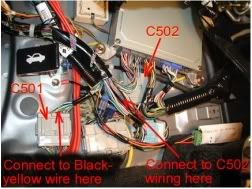
EDIT (March 13/03): Please scroll down to "Modifry's" post. I have taken his suggestion on tapping into a different wire to unlock the passenger door and it is far simpler to do it his way than what you are about to see in my pics. I have posted a pic of the new button further down.
1st, thanks to "Modifry" for the idea (see his web site). Now the trunk release in the glove box will work only when ignition is on AND the accessory power outlet is "hot" all the time.
I wanted to be able to unlock the passenger door from the driver's seat. The keyless remote won't work when the key is in the ignition and the driver's door switch will "lock" both doors but won't unlock the other door. It's ungainly to reach over the "hump" especially if I'm belted in and sometimes it's nice to unlock when you're doing a "touch and go" pick up.
PS. I'm going to give Modifry a shameless free plug by putting up his site. From here, you can see all of his electronic mods (see "freebies").
http://www.modifry.com/

Community Organizer


Joined: Oct 2000
Posts: 8,632
Likes: 141
From: Chapel Hill, NC
 WIRE TAPS!!!!! DON'T USE THEM! They fail! Please break out the wire strippers/solder/3M electrical tape. Makes me do this.
COUGH......hacker......COUGH!
 Just playing with ya. But seriously DON'T USE WIRE TAPS!

Honorary Member


Joined: May 2001
Posts: 2,121
Likes: 3
From: Indian Land SC
xviper - you should have PM'd me to ask for suggestions. I didn't read your post completely, but I assume you are supplying power to the passenger lock solenoid through your switch. There's a much easier way.
When I designed my "convenience module", I connected it to the driver's door key switch wire. This wire is connected to ground when you put the key in the door lock and turn it to "unlock". The stock wiring is set up to unlock the driver's door first (manually with the key), then if you continue to hold the key in the "unlock" position for 2 more seconds, it will unlock the passenger door.
This function works all the time, ignition on or not. So, if you connect a momentary push button from ground to the key switch wire, pressing the button for 2 seconds unlocks the passenger door. This method uses the existing unlock circuitry, so there's no chance of a "collision" with the switches. And the key switch wire is on the driver's side, so it's easier to wire.
And I agree with you on the t-tap connectors. The only failure I've ever seen were due to mis-application. Either wrong size connector, poor crimping, or drawing too much current for the connector. If you need a lot of current, or the wires are going to flex a lot, then I'd agree on the solder and heatshrink.
When I designed my "convenience module", I connected it to the driver's door key switch wire. This wire is connected to ground when you put the key in the door lock and turn it to "unlock". The stock wiring is set up to unlock the driver's door first (manually with the key), then if you continue to hold the key in the "unlock" position for 2 more seconds, it will unlock the passenger door.
This function works all the time, ignition on or not. So, if you connect a momentary push button from ground to the key switch wire, pressing the button for 2 seconds unlocks the passenger door. This method uses the existing unlock circuitry, so there's no chance of a "collision" with the switches. And the key switch wire is on the driver's side, so it's easier to wire.
And I agree with you on the t-tap connectors. The only failure I've ever seen were due to mis-application. Either wrong size connector, poor crimping, or drawing too much current for the connector. If you need a lot of current, or the wires are going to flex a lot, then I'd agree on the solder and heatshrink.
Thread Starter
Joined: Mar 2001
Posts: 37,305
Likes: 18
Modifry, again, thanks for the tip. I really did prefer to use a momentary ON type of switch but couldn't find one that did what I thought it needed to do. So all I needed was a simple switch that grounded one wire for 2 seconds? What color is this wire and where would I tap into it? 
Thread Starter
Joined: Mar 2001
Posts: 37,305
Likes: 18
[QUOTE]Originally posted by modifry
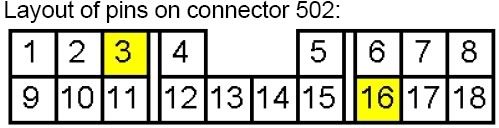
[B]OK, look at this drawing and make note of the white wire marked "door" on my Convenience Module that taps into connector C502 on pin 3.
[B]OK, look at this drawing and make note of the white wire marked "door" on my Convenience Module that taps into connector C502 on pin 3.

