


Finally, this guy has an S2000


Thread Starter
Registered User
Joined: Aug 2012
Posts: 115
Likes: 0
 Finally, this guy has an S2000
After a life time of being a car enthusiast, and 13 years of being an S2000 fanatic, I have my very own! Long Beach Circa 1999, my pops took me to the auto show. My buddy was with me and us being a couple of punk wanna be Honda tuners with civic's, were mezmorized by the specs of this new Honda "super car" and that's all we cared about seeing.
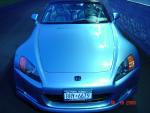
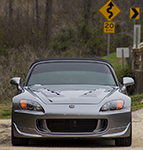
Kinky Kiley is a 2001, all stock except a K&N filter I recently installed. I'm getting a clutch masters stage 2 clutch kit and new lighter fly wheel. I'm going to put the AP2 V1 wheels on it because I'm a huge fan of the way they look and a fan of keeping my car as close to original as possible. I would like to do a very mild upgrade to my suspension.I would like it to be a little bit better than stock, but not have a ridiculous ride. If anyone knows of a suspension system that can give me better handling, but not a full tilt hardcore race setup, that can also maintain the ride height or only lower it .5". I can't wait to post some pics. I'm going to try to figure that out.
Finally, its awesome that there's a place where I can drift off in s2000 Lala land. Finally other people that understand that tingle in your bones, the child giddiness you get as you climb in and push to start. It's so visceral.
Thanks guys
Kinky Kiley is a 2001, all stock except a K&N filter I recently installed. I'm getting a clutch masters stage 2 clutch kit and new lighter fly wheel. I'm going to put the AP2 V1 wheels on it because I'm a huge fan of the way they look and a fan of keeping my car as close to original as possible. I would like to do a very mild upgrade to my suspension.I would like it to be a little bit better than stock, but not have a ridiculous ride. If anyone knows of a suspension system that can give me better handling, but not a full tilt hardcore race setup, that can also maintain the ride height or only lower it .5". I can't wait to post some pics. I'm going to try to figure that out.
Finally, its awesome that there's a place where I can drift off in s2000 Lala land. Finally other people that understand that tingle in your bones, the child giddiness you get as you climb in and push to start. It's so visceral.
Thanks guys



Administrator


Joined: Jun 2004
Posts: 11,315
Likes: 247
From: Tulsa, Oklahoma USA
Welcome aboard!  Do you have pix of Kinky Kiley
  hosted somewhere already? If not, you can purchase an S2KI membership and host them here. Otherwise, you can host them elsewhere and image link them into your post here.
For example, if you have them hosted on flickr, you have to click Actions, then View all sizes, click on a size (I usually select a medium size like 800x600 or similar), then right-click on the image, select Copy image URL, and then paste (Ctrl+V) that here within IMG tags. Sounds like a lot of work, huh? Maybe there's an easier way.
If you use Photobucket as your image host, they automatically give you the image link code to copy and paste here. It's the "IMG code" option under the Share or Links menu.
If you have a smart phone, you can download Tapatalk and upload images directly from your phone.
If you have a facebook account, you can grab the image URL (right-click on the image, select Copy image URL) and paste it here using the "Insert image" button.
Basically, once you have the image hosted somewhere, what you want to do is obtain the URL that ends with the photo's file extension which is usually ".jpg." Here's an example of what a proper image link looks like:
Oh and the "right-click on the image, select Copy image URL" is only valid if you're using Google Chrome. If you're using Internet Explorer, the only way I know how to obtain an image's URL in IE is to right-click on the image, select Properties, triple-click the Address (URL) to select it, Ctrl+C to copy, then Ctrl+V to paste it.
Hope that made sense.
Do you have pix of Kinky Kiley hosted somewhere already? If not, you can purchase an S2KI membership and host them here. Otherwise, you can host them elsewhere and image link them into your post here.For example, if you have them hosted on flickr, you have to click Actions, then View all sizes, click on a size (I usually select a medium size like 800x600 or similar), then right-click on the image, select Copy image URL, and then paste (Ctrl+V) that here within IMG tags. Sounds like a lot of work, huh? Maybe there's an easier way.
If you use Photobucket as your image host, they automatically give you the image link code to copy and paste here. It's the "IMG code" option under the Share or Links menu.
If you have a smart phone, you can download Tapatalk and upload images directly from your phone.
If you have a facebook account, you can grab the image URL (right-click on the image, select Copy image URL) and paste it here using the "Insert image" button.
Basically, once you have the image hosted somewhere, what you want to do is obtain the URL that ends with the photo's file extension which is usually ".jpg." Here's an example of what a proper image link looks like:
Code:

Hope that made sense.
Thread Starter
Registered User
Joined: Aug 2012
Posts: 115
Likes: 0
Trending Topics
Thread Starter
Registered User
Joined: Aug 2012
Posts: 115
Likes: 0
