


Dumb n00b question


Thread Starter
Registered User

Joined: Mar 2005
Posts: 20,306
Likes: 0
From: On the back wheel. . .
 Dumb n00b question
Hi all,
The girlfriend and I bought ourselves a Canon EOS400D for Christmas, and I have finally got round to downloading some pictures to my pc.
All the pictures are RAW - and now I guess I need to process them?
But how?
What do I do to them?
I could read the manual in detail, but I'm sure you all will be able to put it in to layman's terms for me.
At present all I have is the software that came with the camera . . .
Please help!
TIA
The girlfriend and I bought ourselves a Canon EOS400D for Christmas, and I have finally got round to downloading some pictures to my pc.
All the pictures are RAW - and now I guess I need to process them?
But how?
What do I do to them?
I could read the manual in detail, but I'm sure you all will be able to put it in to layman's terms for me.
At present all I have is the software that came with the camera . . .
Please help!
TIA

Registered User
Joined: Jul 2004
Posts: 1,560
Likes: 0
From: Dorset/Somerset

RAW is the uncompressed data. The software that comes with the Camera should be able to view them, edit and export them to a normal jpeg photo. Or if you have Photoshop or I think Picasa (googles photo management software) will do RAW as well.
You can change what your camera saves to in the menu, if you don't want to lots of editing you may as well just set it to the highest JPEG setting, easier to manage and you can get a lot more to a memory card.
But as for getting to you pics, install what came with the camera and plug in the USB, should just work!
You can change what your camera saves to in the menu, if you don't want to lots of editing you may as well just set it to the highest JPEG setting, easier to manage and you can get a lot more to a memory card.
But as for getting to you pics, install what came with the camera and plug in the USB, should just work!

Registered User
Joined: Jul 2004
Posts: 1,560
Likes: 0
From: Dorset/Somerset
You don't have to edit them at all if your happy with them. Things like adjusting the exposure is quite useful with a RAW photo. I'm sure there will be someone along that uses RAW more then me to explain what you can do with them a bit better
Registered User
Joined: Aug 2005
Posts: 6,242
Likes: 0
From: Branford, CT
Originally Posted by hyb,Feb 14 2007, 11:38 AM
You don't have to edit them at all if your happy with them. Things like adjusting the exposure is quite useful with a RAW photo. I'm sure there will be someone along that uses RAW more then me to explain what you can do with them a bit better

Trending Topics



Registered User
Joined: May 2001
Posts: 1,260
Likes: 0
From: Tree Town
Originally Posted by NFRs2000NYC,Feb 14 2007, 03:14 PM
Here is a PERFECT example (noodle, hope you dont mind Im using your awesome pics for a comparison)

And yes, I recommend going back to JPEG until you get comfortable with the camera. Learn how to use the camera first, then you can worry about RAW processing to get the best out of your camera you just learned

Registered User
Joined: Nov 2005
Posts: 242
Likes: 0
From: Irvine
Originally Posted by NFRs2000NYC,Feb 14 2007, 12:14 PM

Here is a PERFECT example (noodle, hope you dont mind Im using your awesome pics for a comparison)
RAW:
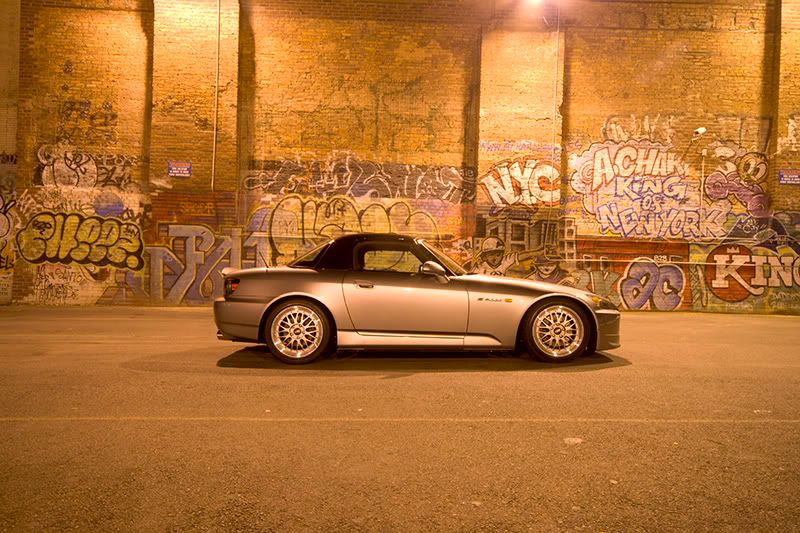
This is a RAW pic without any editing. Looks ok at best. Sure you can save it, print it, and call it a day, but why? The point of having a camera like a 400D is to get every ounce of photo quality/beauty possible.
After post editing, you picture will come out like this....
JPEG edited:

The difference is uncomparable.
Get photoshop, learn a bit of it, and youll be on your way to great photography. RAW format is made to be edited.