Long exposure light painting on my s2000


Thread Starter
Registered User
Joined: Feb 2006
Posts: 34
Likes: 0
 Long exposure light painting on my s2000
Hey all,
I love reading and checking out all the cool photos on here, and though I would finally post some of my own. Since I have the s2000 all waxed up and ready to sell, I wanted some good photos before she goes.
These were all taken with a single longer exposure of usually about one minute, with camera set on tripod. Most of them were at between ISO 100 to 400, and aperture of f5.6 to f8.0, to make sure the whole scene is very sharp, and there was enough depth of field.
Then you use some flashlights or strobe bursts (lower power about 1/32 or so) to paint in what you want to see. There were a few with waving around some lights or sparklers in the background.


I love reading and checking out all the cool photos on here, and though I would finally post some of my own. Since I have the s2000 all waxed up and ready to sell, I wanted some good photos before she goes.
These were all taken with a single longer exposure of usually about one minute, with camera set on tripod. Most of them were at between ISO 100 to 400, and aperture of f5.6 to f8.0, to make sure the whole scene is very sharp, and there was enough depth of field.
Then you use some flashlights or strobe bursts (lower power about 1/32 or so) to paint in what you want to see. There were a few with waving around some lights or sparklers in the background.


Thread Starter
Registered User
Joined: Feb 2006
Posts: 34
Likes: 0

Originally Posted by zzziippyyy,Sep 19 2010, 10:42 AM
Interesting, but you really need to light paint without capturing the people in the pic 

Registered User
Joined: Aug 2010
Posts: 504
Likes: 0
From: OC
How'd you do the clear engine bay w/o showing traces of the hood being open? I'm assuming you opened the hood during the long exposure, then closed it to get this effect? Or did you superimpose or remove any traces of the hood during post?
Thread Starter
Registered User
Joined: Feb 2006
Posts: 34
Likes: 0
[QUOTE=greenbean57,Sep 19 2010, 12:39 PM] How'd you do the clear engine bay w/o showing traces of the hood being open? I'm assuming you opened the hood during the long exposure, then closed it to get this effect?


Trending Topics
Thread Starter
Registered User
Joined: Feb 2006
Posts: 34
Likes: 0

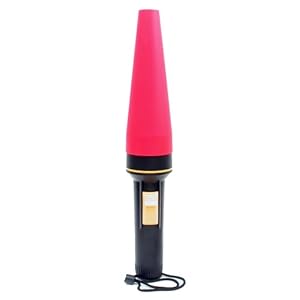
The flashlight looked kind of like this but a bit smaller and you can search for "traffic flashlight" or "safety cone light"
And we did some other light painting with steel wool spinning too. This is always fun.