


need help: HDR.


Thread Starter
Registered User
Joined: Mar 2007
Posts: 11,093
Likes: 1
From: NYC
 need help: HDR.
i think i figured out how hdr works, im oblivious to this ish.
when attempting hdr you need 3 shots right, normal over exposed and underexposed? Canons AEB feature is used for this right.
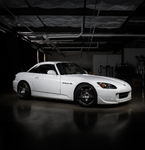
if so, here are 3 pics, all the same but different exposures. can someone walk me thru turning this into an hdr shot?


when attempting hdr you need 3 shots right, normal over exposed and underexposed? Canons AEB feature is used for this right.
if so, here are 3 pics, all the same but different exposures. can someone walk me thru turning this into an hdr shot?


Registered User
Joined: Jun 2003
Posts: 3,951
Likes: 0
From: Pembroke
First off, the ricer angle almost gave me a seizure....enough of that.
Second, you need a scene with a lot of dynamic range (ie lots of detail in shadows, lots of detail in highlights, but unable to capture both in 1 picture). This scene does not have a lot of dynamic range. Yes, the overexposed shot offers a lot of things in the back ground, but look at the under exposed shot. What detail are you trying to recover in this shot? The only thing I see are the headlights.
You need to pick a different scene for HDR to work.
Second, you need a scene with a lot of dynamic range (ie lots of detail in shadows, lots of detail in highlights, but unable to capture both in 1 picture). This scene does not have a lot of dynamic range. Yes, the overexposed shot offers a lot of things in the back ground, but look at the under exposed shot. What detail are you trying to recover in this shot? The only thing I see are the headlights.
You need to pick a different scene for HDR to work.
Thread Starter
Registered User
Joined: Mar 2007
Posts: 11,093
Likes: 1
From: NYC
Originally Posted by 03_AP1' date='Jan 26 2009, 05:07 PM
First off, the ricer angle almost gave me a seizure....enough of that.
Second, you need a scene with a lot of dynamic range (ie lots of detail in shadows, lots of detail in highlights, but unable to capture both in 1 picture). This scene does not have a lot of dynamic range. Yes, the overexposed shot offers a lot of things in the back ground, but look at the under exposed shot. What detail are you trying to recover in this shot? The only thing I see are the headlights.
You need to pick a different scene for HDR to work.
Second, you need a scene with a lot of dynamic range (ie lots of detail in shadows, lots of detail in highlights, but unable to capture both in 1 picture). This scene does not have a lot of dynamic range. Yes, the overexposed shot offers a lot of things in the back ground, but look at the under exposed shot. What detail are you trying to recover in this shot? The only thing I see are the headlights.
You need to pick a different scene for HDR to work.

thank you, thats the kind of info i need.
much appreciated.
was a ricer shot i guess......was the only shot were i used the function.
that is the funtion to use correct, AEB on canon?


Trending Topics

Registered User

Joined: Mar 2008
Posts: 605
Likes: 0
I take each shot one at a time and manually change the exposure for each shot. I'm using a Nikon D50 for this. What camera are you shooting with?
The kit lens isn't crappy It may not be on the same level as high dollar glass, but it is certainly not a bad lens by any means.
As previously suggested, you need to pick a setting that offers more dynamic range between highlights and shadows so that you can recover details from the under exposed image and really make it pop. Merging the images you just posted to HDR won't create a spectaculr result like you are probably expecting. It is also ideal to shoot the photos in RAW instead of JPEG or other file types. This way, you preserve as much of the detail in each shot as you can (RAW is basically a digital negative, the image is not compressed into a different format when it is taken and is ideal for use with post processing because it retains the largest amount of information).
When you process your photos for HDR, what software are you going to use? I use Photoshop CS3 extended with the Photomatix plugin for tone mapping.
The kit lens isn't crappy
It may not be on the same level as high dollar glass, but it is certainly not a bad lens by any means.As previously suggested, you need to pick a setting that offers more dynamic range between highlights and shadows so that you can recover details from the under exposed image and really make it pop. Merging the images you just posted to HDR won't create a spectaculr result like you are probably expecting. It is also ideal to shoot the photos in RAW instead of JPEG or other file types. This way, you preserve as much of the detail in each shot as you can (RAW is basically a digital negative, the image is not compressed into a different format when it is taken and is ideal for use with post processing because it retains the largest amount of information).
When you process your photos for HDR, what software are you going to use? I use Photoshop CS3 extended with the Photomatix plugin for tone mapping.


Joined: Apr 2006
Posts: 648
Likes: 2
From: Plano, Tx
There's a few ways and techniques to make it HDR or HDR-ish, and it can be from 1-12 photos give or take blah blah blah.
I just started messing with HDR. Check out the tutorial on www.stuckincustoms.com if you wanna know in detail about it. And how to make it look more natural.
But like others said there does need to be more dynamic range.
I just basically threw this in Photomatix 3.0

A pic from a set I took of my uncles place. Inside was somewhat dark with that indirect light coming in but outside was pretty bright.

I just started messing with HDR. Check out the tutorial on www.stuckincustoms.com if you wanna know in detail about it. And how to make it look more natural.
But like others said there does need to be more dynamic range.
I just basically threw this in Photomatix 3.0
A pic from a set I took of my uncles place. Inside was somewhat dark with that indirect light coming in but outside was pretty bright.