Software Dyno for FlashPro users (and maybe KPro)


Registered User
Joined: Sep 2007
Posts: 666
Likes: 0
From: Germany - Spain

Your graphs will go up and down depending on incline / decline of the road, increased wind or rolling resistance, and obiviously changes in weight. For you guysoutside the US, there may also be differences in gearing that would throw it off. I'm not sure if you guys have the same transmission, final drive, and / or tires as the USDM AP2V2.
in Europe our MY06+ models have the following gearing:
1. Gear 3,133
2. Gear 2,045
3. Gear 1,481
4. Gear 1,161
5. Gear 0,970
6. Gear 0,810
Reverse 2,800
Final Drive 4,100
Maybe you can add a EDM option to be able to draw "compatible" graphs?
Tires/Wheels are exactly the same as in the USA ap2 models
Our engine is the F20c (same rpm cut as the USDM AP1)
Do you need further informations?


Joined: Apr 2010
Posts: 570
Likes: 16
Below is a sample output using the FlashPro datalogs in the Old and New Soft Dynos. All of the screen shots were generated using the same Datalog. Some may prefer the Excel version, since it has less "noise" in the plots, but I prefer the detail that the new version offers. It's amazing how much better of a tune you can get with the added detail.
Excel-based Soft Dyno:
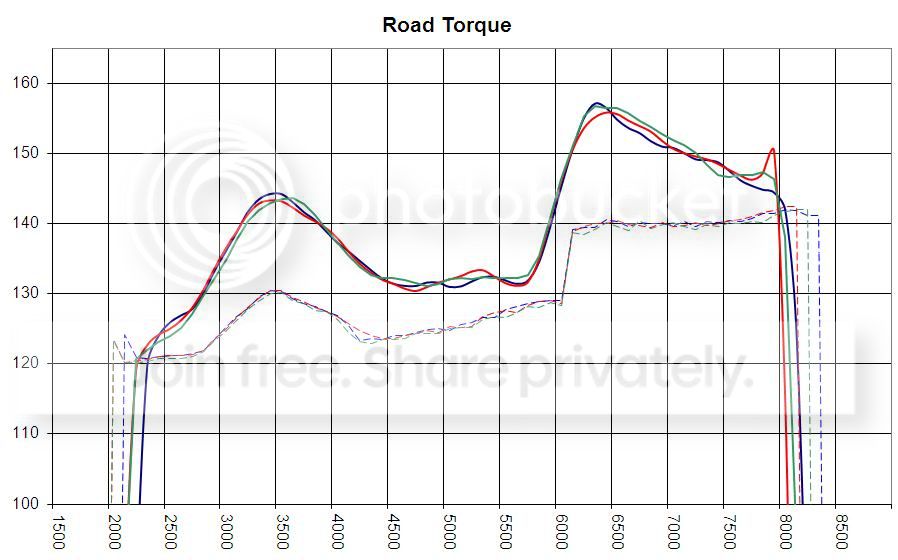
.Net Standalone Soft Dyno:
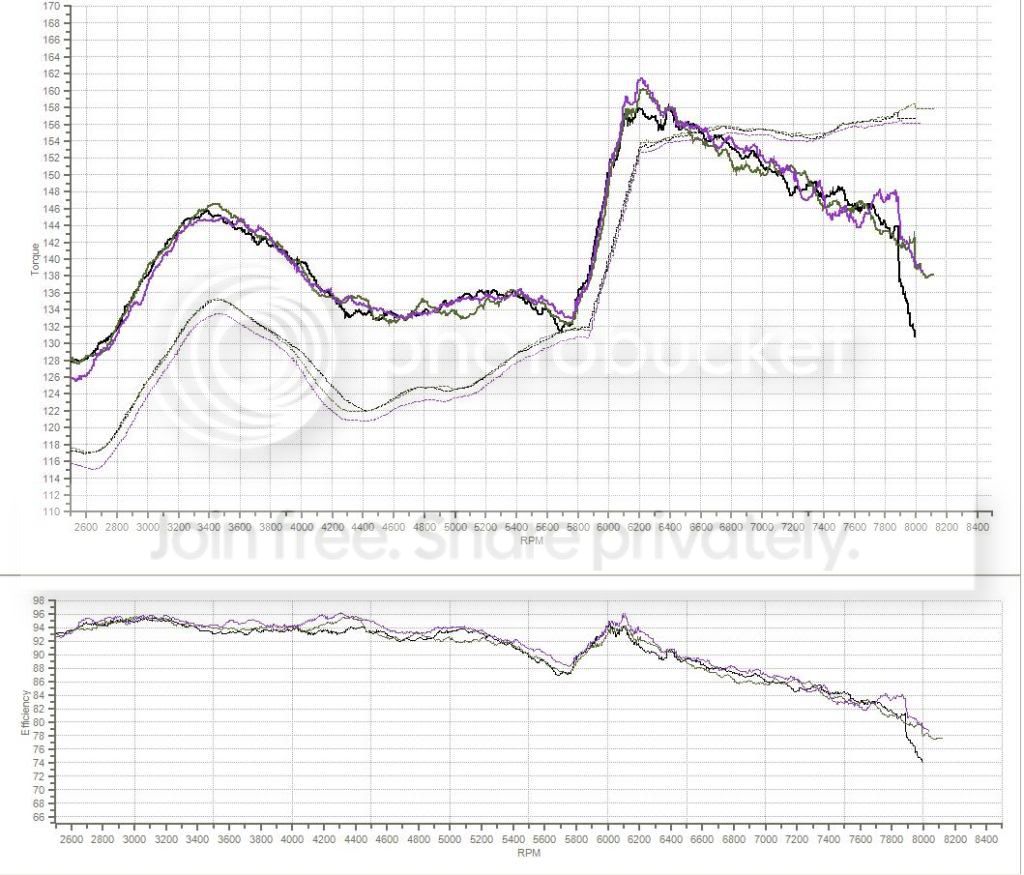
Excel-based Soft Dyno:
.Net Standalone Soft Dyno:

Thread Starter
Former Sponsor
Joined: Mar 2002
Posts: 15,526
Likes: 19
However, there is a bunch of raw CAN data flowing between the many ECU's in the car (VSA, ECM, etc.), and that data is at a much higher resolution. The speed signal that is sent by the VSA ECU is about 40 frames per second AND is a very high resolution 16 bit number (0-65000).
Joined: Apr 2010
Posts: 570
Likes: 16
Originally Posted by imstimpy' timestamp='1381770731' post='22826877
Gernby, can you explain to me how you found extra resolution by going to the CAN dyno?
However, there is a bunch of raw CAN data flowing between the many ECU's in the car (VSA, ECM, etc.), and that data is at a much higher resolution. The speed signal that is sent by the VSA ECU is about 40 frames per second AND is a very high resolution 16 bit number (0-65000).
In terms of dyno resolution, or work being done, time and vehicle speed are of utmost importance. The rest, such as AFR, can be interpolated between points without much loss of detail.
Joined: Apr 2010
Posts: 570
Likes: 16
If anybody attempts to use this spreadsheet with later builds of Hondata (1.6+ I think), it won't work out of the box. Hondata added "PTANK" to the logs and it shifts key values ("MAP" and "INJ") to different columns.
The easy fix is to open your CSV logs and delete the entire "PTANK" column before importing it through the software dyno. The far more complicated fix is to edit the macros, which I've done. I can further explain the macro changes, but given that nobody else has posted here I'm not sure it is worth my time to create a diff.
The easy fix is to open your CSV logs and delete the entire "PTANK" column before importing it through the software dyno. The far more complicated fix is to edit the macros, which I've done. I can further explain the macro changes, but given that nobody else has posted here I'm not sure it is worth my time to create a diff.


Joined: Apr 2012
Posts: 1,016
Likes: 6
If anybody attempts to use this spreadsheet with later builds of Hondata (1.6+ I think), it won't work out of the box. Hondata added "PTANK" to the logs and it shifts key values ("MAP" and "INJ") to different columns.
The easy fix is to open your CSV logs and delete the entire "PTANK" column before importing it through the software dyno. The far more complicated fix is to edit the macros, which I've done. I can further explain the macro changes, but given that nobody else has posted here I'm not sure it is worth my time to create a diff.
The easy fix is to open your CSV logs and delete the entire "PTANK" column before importing it through the software dyno. The far more complicated fix is to edit the macros, which I've done. I can further explain the macro changes, but given that nobody else has posted here I'm not sure it is worth my time to create a diff.

Registered User
Joined: Mar 2013
Posts: 21
Likes: 0
From: Canada
If anybody attempts to use this spreadsheet with later builds of Hondata (1.6+ I think), it won't work out of the box. Hondata added "PTANK" to the logs and it shifts key values ("MAP" and "INJ") to different columns.
The easy fix is to open your CSV logs and delete the entire "PTANK" column before importing it through the software dyno. The far more complicated fix is to edit the macros, which I've done. I can further explain the macro changes, but given that nobody else has posted here I'm not sure it is worth my time to create a diff.
The easy fix is to open your CSV logs and delete the entire "PTANK" column before importing it through the software dyno. The far more complicated fix is to edit the macros, which I've done. I can further explain the macro changes, but given that nobody else has posted here I'm not sure it is worth my time to create a diff.
Thanks Imstimpy,
Finally I made it to work.
I could not figure it out how to fix this issue for somtimes.
Yes I will appreciate very much if you can explain how to edit the macros
Cheers
Mike
Joined: Apr 2010
Posts: 570
Likes: 16
Here is my diff. You need to go into the macro editor to find this code. All changes but the last are in BatchProcessCSV and the last change is in ImportCSV.
The important changes you need are the first two that define and set int***Idx, the next two that replace the hard-coded indices with the variable int***Idxs, and finally the last that removes "PTANK" from the CSV. If you want to keep it really simple, all you need to do is replace varInput(6) with varInput(7), varInput(11) with varInput(12), then remove "PTANK" from the CSV. There are two additional changes with intExtraRows and lngLineCount that alter the consistency of the graphing and they are optional.
The important changes you need are the first two that define and set int***Idx, the next two that replace the hard-coded indices with the variable int***Idxs, and finally the last that removes "PTANK" from the CSV. If you want to keep it really simple, all you need to do is replace varInput(6) with varInput(7), varInput(11) with varInput(12), then remove "PTANK" from the CSV. There are two additional changes with intExtraRows and lngLineCount that alter the consistency of the graphing and they are optional.
Code:
--- original.txt	2014-05-01 09:35:18.713136991 -0500
+++ updated.txt	2014-05-01 09:54:18.741136981 -0500
@@ -297,6 +297,8 @@
     Dim blnSkipShortRuns As Boolean
     Dim blnAlreadyAskedAboutShortRuns As Boolean
     Dim intMaxRPM As Integer
+    Dim intTPedalIdx As Integer
+    Dim intINJIdx As Integer

     On Error GoTo ErrHandler

@@ -321,7 +323,17 @@
     strFileHeader = objInputTS.ReadLine
     strFileHeader = strFileHeader & vbNewLine & objInputTS.ReadLine
     strFileHeader = strFileHeader & vbNewLine & objInputTS.ReadLine
-    strFileHeader = strFileHeader & vbNewLine & objInputTS.ReadLine
+    strLineIn = objInputTS.ReadLine
+    strFileHeader = strFileHeader & vbNewLine & strLineIn
+
+    varInput = Split(strLineIn, ",")
+    If varInput(5) = "PTANK" Then
+        intTPedalIdx = 7
+        intINJIdx = 12
+    Else
+        intTPedalIdx = 6
+        intINJIdx = 11
+    End If

     intFileCount = 1

@@ -362,7 +374,7 @@

             varInput = Split(strLineIn, ",")
             If blnInWOT = False Then
-                If varInput(6) > 90 And ((varInput(2) < 3000 And varInput(4) = 3) Or (varInput(4) = 4 And InStr(UCase(strFileName), "DYNO") > 0)) Then
+                If varInput(intTPedalIdx) > 90 And ((varInput(2) < 3000 And varInput(4) = 3) Or (varInput(4) = 4 And InStr(UCase(strFileName), "DYNO") > 0)) Then
                     blnInWOT = True
                     lngLineCount = 0
                     Set objOutputTS = objFileSystem.CreateTextFile(strOutFileName, True)
@@ -370,16 +382,16 @@
                     intMaxRPM = 0
                 End If
             Else
-                If varInput(6) <= 90 Or (varInput(4) <> 3 And InStr(UCase(strFileName), "DYNO") = 0) Or (varInput(4) <> 4 And InStr(UCase(strFileName), "DYNO") > 0) Or varInput(11) = 0 Then
+                If varInput(intTPedalIdx) <= 90 Or (varInput(4) <> 3 And InStr(UCase(strFileName), "DYNO") = 0) Or (varInput(4) <> 4 And InStr(UCase(strFileName), "DYNO") > 0) Or varInput(intINJIdx) = 0 Then
                     If intMaxRPM = 0 And intExtraRows = 0 Then intMaxRPM = varInput(2)

-                    If intExtraRows < 100 And Not objInputTS.AtEndOfStream Then
+                    If intExtraRows < 50 And Not objInputTS.AtEndOfStream Then
                         intExtraRows = intExtraRows + 1
                     Else
                         intExtraRows = 0
                         blnInWOT = False
                         objOutputTS.Close
-                        If lngLineCount < 100 Then
+                        If lngLineCount < 100 And MsgBox("Run # " & intFileCount & " has " & lngLineCount & " samples. Do you you want to keep this run?", vbYesNo) = vbNo Then
                             Kill (strOutFileName)
                             intFileCount = intFileCount - 1
                         Else
@@ -924,6 +936,7 @@
                     Exit Sub
                 End If

+                If wksImport.Range("F4") = "PTANK" Then wksImport.Range("F:F").EntireColumn.Delete
                 If wksImport.Range("Q4") = "ECT2" Then wksImport.Range("Q:Q").EntireColumn.Delete

                 wksImport.Range("AL1:AZ1").EntireColumn.Delete
Registered User
Joined: Mar 2013
Posts: 21
Likes: 0
From: Canada
Here is my diff. You need to go into the macro editor to find this code. All changes but the last are in BatchProcessCSV and the last change is in ImportCSV.
The important changes you need are the first two that define and set int***Idx, the next two that replace the hard-coded indices with the variable int***Idxs, and finally the last that removes "PTANK" from the CSV. If you want to keep it really simple, all you need to do is replace varInput(6) with varInput(7), varInput(11) with varInput(12), then remove "PTANK" from the CSV. There are two additional changes with intExtraRows and lngLineCount that alter the consistency of the graphing and they are optional.
The important changes you need are the first two that define and set int***Idx, the next two that replace the hard-coded indices with the variable int***Idxs, and finally the last that removes "PTANK" from the CSV. If you want to keep it really simple, all you need to do is replace varInput(6) with varInput(7), varInput(11) with varInput(12), then remove "PTANK" from the CSV. There are two additional changes with intExtraRows and lngLineCount that alter the consistency of the graphing and they are optional.
Code:
--- original.txt	2014-05-01 09:35:18.713136991 -0500
+++ updated.txt	2014-05-01 09:54:18.741136981 -0500
@@ -297,6 +297,8 @@
     Dim blnSkipShortRuns As Boolean
     Dim blnAlreadyAskedAboutShortRuns As Boolean
     Dim intMaxRPM As Integer
+    Dim intTPedalIdx As Integer
+    Dim intINJIdx As Integer

     On Error GoTo ErrHandler

@@ -321,7 +323,17 @@
     strFileHeader = objInputTS.ReadLine
     strFileHeader = strFileHeader & vbNewLine & objInputTS.ReadLine
     strFileHeader = strFileHeader & vbNewLine & objInputTS.ReadLine
-    strFileHeader = strFileHeader & vbNewLine & objInputTS.ReadLine
+    strLineIn = objInputTS.ReadLine
+    strFileHeader = strFileHeader & vbNewLine & strLineIn
+
+    varInput = Split(strLineIn, ",")
+    If varInput(5) = "PTANK" Then
+        intTPedalIdx = 7
+        intINJIdx = 12
+    Else
+        intTPedalIdx = 6
+        intINJIdx = 11
+    End If

     intFileCount = 1

@@ -362,7 +374,7 @@

             varInput = Split(strLineIn, ",")
             If blnInWOT = False Then
-                If varInput(6) > 90 And ((varInput(2) < 3000 And varInput(4) = 3) Or (varInput(4) = 4 And InStr(UCase(strFileName), "DYNO") > 0)) Then
+                If varInput(intTPedalIdx) > 90 And ((varInput(2) < 3000 And varInput(4) = 3) Or (varInput(4) = 4 And InStr(UCase(strFileName), "DYNO") > 0)) Then
                     blnInWOT = True
                     lngLineCount = 0
                     Set objOutputTS = objFileSystem.CreateTextFile(strOutFileName, True)
@@ -370,16 +382,16 @@
                     intMaxRPM = 0
                 End If
             Else
-                If varInput(6) <= 90 Or (varInput(4) <> 3 And InStr(UCase(strFileName), "DYNO") = 0) Or (varInput(4) <> 4 And InStr(UCase(strFileName), "DYNO") > 0) Or varInput(11) = 0 Then
+                If varInput(intTPedalIdx) <= 90 Or (varInput(4) <> 3 And InStr(UCase(strFileName), "DYNO") = 0) Or (varInput(4) <> 4 And InStr(UCase(strFileName), "DYNO") > 0) Or varInput(intINJIdx) = 0 Then
                     If intMaxRPM = 0 And intExtraRows = 0 Then intMaxRPM = varInput(2)

-                    If intExtraRows < 100 And Not objInputTS.AtEndOfStream Then
+                    If intExtraRows < 50 And Not objInputTS.AtEndOfStream Then
                         intExtraRows = intExtraRows + 1
                     Else
                         intExtraRows = 0
                         blnInWOT = False
                         objOutputTS.Close
-                        If lngLineCount < 100 Then
+                        If lngLineCount < 100 And MsgBox("Run # " & intFileCount & " has " & lngLineCount & " samples. Do you you want to keep this run?", vbYesNo) = vbNo Then
                             Kill (strOutFileName)
                             intFileCount = intFileCount - 1
                         Else
@@ -924,6 +936,7 @@
                     Exit Sub
                 End If

+                If wksImport.Range("F4") = "PTANK" Then wksImport.Range("F:F").EntireColumn.Delete
                 If wksImport.Range("Q4") = "ECT2" Then wksImport.Range("Q:Q").EntireColumn.Delete

                 wksImport.Range("AL1:AZ1").EntireColumn.Delete
Wow! Now everything is working!
Thank you so much.
I really apreciate for doing this.
It's going to be a really good tool to use when tuning,
Cheers
Mike.