


Photoshop Help Please!


Thread Starter
Registered User
Joined: Feb 2002
Posts: 1,009
Likes: 1
From: Philadelphia
 Photoshop Help Please!
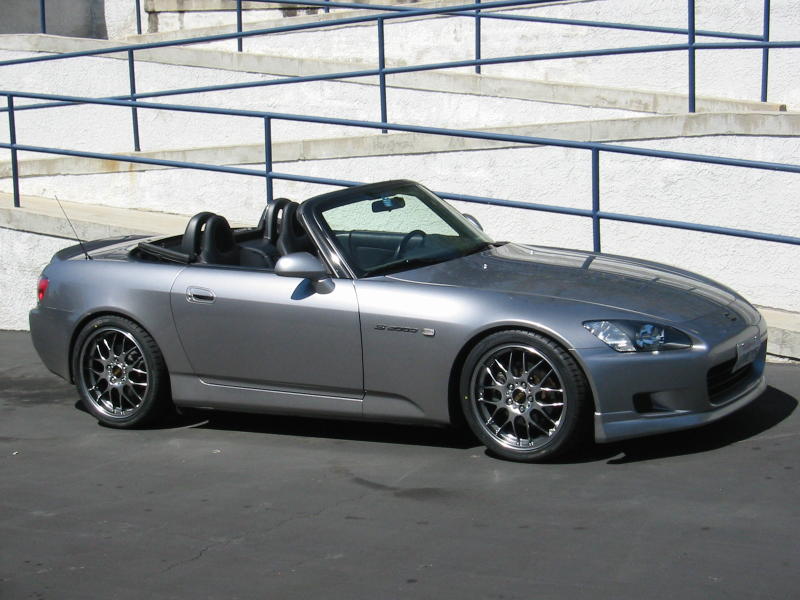
Could anyone photoshop the car at the link below and make it GP white? I want to see what the white looks like with the amazing BBS RG-R darker wheels. Thanks for anyone's help.
http://www.socal28.com/s2k/s2k_side_rgr2.jpg
http://www.socal28.com/s2k/s2k_side_rgr2.jpg


Thread Starter
Registered User
Joined: Feb 2002
Posts: 1,009
Likes: 1
From: Philadelphia
Dubai, thank you so much! BTW, my father goes to the Dubai several times a year. He is a supplier for DUBAL (the aluminum company). He stays at the Jameira (spelling?) Beach Hotel accross from the big sailboat looking hotel. He is going again for the DUBAL Classic golf tournamnet with Tiger Woods ect in March I believe. I never thought I would meet someone from Dubai on here! Thanks for your help. I love these wheels, I am glad that I have been able to pass a good deal on them to people on this board.
Registered User
Joined: Jul 2001
Posts: 5,167
Likes: 1
From: i <3 ny
too old for photoshop? just how old are you? im going to be 30 in a few weeks, and i cant stop playing with it.. i dont believe that your age has anything to do with photoshop.. it's not a game or anything..
thanks for making me feel old
thanks for making me feel old
Trending Topics

Registered User
Joined: Oct 2002
Posts: 1,611
Likes: 0
From: Dubai
I have been calling some friends (Younger than me) asking them how to do this effect... I somehow forgot .. and wanted to know a better way to do it....
were I was the one who introduced photoshop to them... now they r teaching me. !
I see some nice talents from you.. I noticed you have this touch of yellow fade thing on ur images... I like it
try to work on this image again please ... I know it could be done better, it is pearl white to me. i want to compare..
Thank you in advance
were I was the one who introduced photoshop to them... now they r teaching me. !
I see some nice talents from you.. I noticed you have this touch of yellow fade thing on ur images... I like it
try to work on this image again please ... I know it could be done better, it is pearl white to me. i want to compare..
Thank you in advance

Registered User
Joined: Jun 2001
Posts: 7,446
Likes: 1
From: West Mids.
Originally posted by Dubai
try to work on this image again please ... I know it could be done better, it is pearl white to me. i want to compare..
try to work on this image again please ... I know it could be done better, it is pearl white to me. i want to compare..
I've just sprayed a front wing
 to show you my approach which I think is the quickest and the best..
Draw a mask as accurately as you can around the area you want to paint. Whilst I've done just the wing, you could do pretty well the whole car with just one mask and one click of the fill tool. Once you've drawn your mask, promote it to a layer (I'm using PSP by the way). Experiment with the density of the paint by clicking with the fill tool within the mask, undoing each time, till you get the density you want. Once you use the fill tool it's important not to change the density of the paint if you have to complete the car using white paint with subsequent masks.
Once the car is fully painted, remove the mask. Because you promoted the mask to a layer earlier, you still have your white paint as a floating layer over the top of the image. On top of your layer you can now carefully draw masks to remove the white paint from the lights and the side logo (Very important for a finished look) Once you've drawn each mask, just use the 'cut' command to remove the paint within the mask.
Hope that helps, you did a good job anyway. Too old for Photoshop? you gotta be kidding... this is stuff is one of the best reasons for owning a PC and if you start the learning curve tomorrow it wont be too soon!


