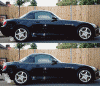
Photoshop Tutorial


Thread Starter
Registered User
Joined: Sep 2002
Posts: 15,176
Likes: 0
From: Under Construction

[QUOTE]Originally posted by S2Kguy
Nice job, but actually, it's a hell of a lot easier than that to change a color...lol.
1. Open the pic
2. Go to Image/Adjust/Hue/Saturation
3. Change the original hue to the desired hue
4. History tool off everything but the car
http://gallery.s2ki.com/imagecatalog/image...eview/106858/6/
Nice job, but actually, it's a hell of a lot easier than that to change a color...lol.
1. Open the pic
2. Go to Image/Adjust/Hue/Saturation
3. Change the original hue to the desired hue
4. History tool off everything but the car
http://gallery.s2ki.com/imagecatalog/image...eview/106858/6/
Thread Starter
Registered User
Joined: Sep 2002
Posts: 15,176
Likes: 0
From: Under Construction
edit ok i got your technique down s2kguy.....it takes a while too, you gotta be careful not to brush the car
A plus on what i taught you guys is if you save "as photoshop image" you can make many different color changes without even worrying of lassoing the thing over anymore all you do is change color and done
its nice to learn many other techniques tho thanks s2kguy
A plus on what i taught you guys is if you save "as photoshop image" you can make many different color changes without even worrying of lassoing the thing over anymore all you do is change color and done
its nice to learn many other techniques tho thanks s2kguy



Joined: Dec 2000
Posts: 4,404
Likes: 2
From: Cape Girardeau
Yeah, I noticed I left the front marker purple after I'd posted the pic, and it was too much trouble to repost it...lol.
Shift_9K: The History Tool is my absolute favorite tool! Look at the last photoshop pic I posted, now look in the left toolbar, there are 22 tools above the color swatches. The History Tool is in the right column, 5th tool down, it looks like a paintbrush with an arrow around it.
NOTE: you cannot use the history tool after the image is resized, so resize the pic LAST
PS, ALL CREDIT goes to sehenkel, I used to do it the same way as Presidente (which was cool, but it tool a lot longer)
Shift_9K: The History Tool is my absolute favorite tool! Look at the last photoshop pic I posted, now look in the left toolbar, there are 22 tools above the color swatches. The History Tool is in the right column, 5th tool down, it looks like a paintbrush with an arrow around it.
NOTE: you cannot use the history tool after the image is resized, so resize the pic LAST
PS, ALL CREDIT goes to sehenkel, I used to do it the same way as Presidente (which was cool, but it tool a lot longer)


Thread Starter
Registered User
Joined: Sep 2002
Posts: 15,176
Likes: 0
From: Under Construction
you guys are always welcome to add your own tutorials
I am still learning photoshop ( I learned it last year )
and willilng to learn many more techniques.
I'm going to post up a HOW TO CHANGE RIMS tutorial
next time i have the time.
I am still learning photoshop ( I learned it last year )
and willilng to learn many more techniques.
I'm going to post up a HOW TO CHANGE RIMS tutorial
next time i have the time.