


and my pda nav set-up


Thread Starter
Registered User
Joined: May 2002
Posts: 39,285
Likes: 1
From: Franklin MA
 and my pda nav set-up
had this set up in my old s2k and it was pretty easy to set up because my old s2k had an aftermarket headunit with aftermarket x/m so all i had to do before was use a honda pie unit and connect my ppc though that the old x/m and use the aux unit on my old headunit
the challange for my new s2k was that i wanted to keep my factory head unit but play my mp3s, movies, and nav directions though the speakers - i could not use the new honda pie unit because it stated that the factory x/m would need to be unplugged ( a big pia to undo the factory x/m plug) - so i had to use a wired fm modulator - went wired because it sounds better than a wireless (a lot less noise)
The wired unit comes with a switch that shuts off the feed from the antenna and runs the signal into the head unit while on channel 88.7 - figued it wanted a descret location for the switch - a few quick disconects and a dremmal

then i noticed of the door was closed - it would shut off the switch so i had to trim the door just a little

now i need to feed the fm modulator from the head phone jack of my ppc
you can see the wire that i feed from the vent (good thing is that i can push it back into the vent where you hardly see it when the PPC is not being used

once wired i can plug in the unit, hit the switch and tune to 88.7

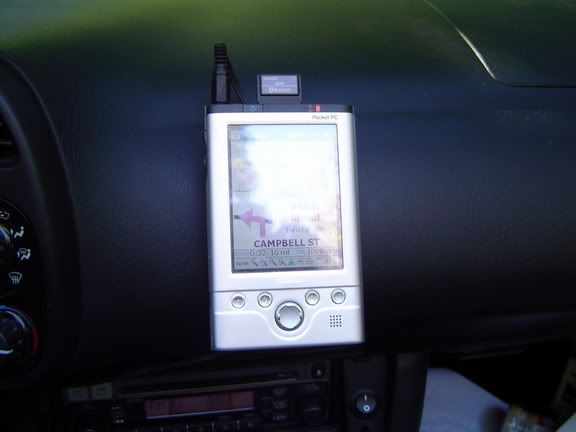
figure i could use some power so i copied a location by the passenger's knee (there is a little gap in this picture but i just fixed it with a dremmal - G-s2k helped me run the wires to a constant feed by the fuse box

oh and for the GPS unit.. i plan to mount it in the trunk with a constant feed and the antenna right behind the windscreen but for now i just placed it on the dash with a little velcro

the challange for my new s2k was that i wanted to keep my factory head unit but play my mp3s, movies, and nav directions though the speakers - i could not use the new honda pie unit because it stated that the factory x/m would need to be unplugged ( a big pia to undo the factory x/m plug) - so i had to use a wired fm modulator - went wired because it sounds better than a wireless (a lot less noise)
The wired unit comes with a switch that shuts off the feed from the antenna and runs the signal into the head unit while on channel 88.7 - figued it wanted a descret location for the switch - a few quick disconects and a dremmal
then i noticed of the door was closed - it would shut off the switch so i had to trim the door just a little
now i need to feed the fm modulator from the head phone jack of my ppc
you can see the wire that i feed from the vent (good thing is that i can push it back into the vent where you hardly see it when the PPC is not being used
once wired i can plug in the unit, hit the switch and tune to 88.7
figure i could use some power so i copied a location by the passenger's knee (there is a little gap in this picture but i just fixed it with a dremmal - G-s2k helped me run the wires to a constant feed by the fuse box
oh and for the GPS unit.. i plan to mount it in the trunk with a constant feed and the antenna right behind the windscreen but for now i just placed it on the dash with a little velcro

Registered User

Joined: Dec 2001
Posts: 2,975
Likes: 0
From: Maricopa County, Arizona
Nice! Looks good!
I like where you put the switch.
I just installed a switch to power off the power adaptor I have plugged in (same spot as yours). I connected it to the stereo power and it was constantly on. I want to redo the location where you put yours now. Now I need to order another left console cover...
I like where you put the switch.
I just installed a switch to power off the power adaptor I have plugged in (same spot as yours). I connected it to the stereo power and it was constantly on. I want to redo the location where you put yours now. Now I need to order another left console cover...

Former Moderator
Joined: Jun 2003
Posts: 18,852
Likes: 1
From: New York
Looks good. I needed a mount for my Dell, because the battery on that thing dies with the quickness. You dont have battery issues???
Other than that, looks great, love where you put the switch. I wish I thought of that!
Other than that, looks great, love where you put the switch. I wish I thought of that!
Thread Starter
Registered User
Joined: May 2002
Posts: 39,285
Likes: 1
From: Franklin MA
Thanks guys
dave - no problem with the battery as it will last about 4 hours on a charge but if i need some juice i can plug it into the power outlet i added because my gps unit shares the same type of plug and it works fine on the pda
dave - no problem with the battery as it will last about 4 hours on a charge but if i need some juice i can plug it into the power outlet i added because my gps unit shares the same type of plug and it works fine on the pda

 I like the button location!


Honorary Member

Joined: May 2001
Posts: 2,121
Likes: 3
From: Indian Land SC
Looks pretty good, which NAV package are you using?
I'm looking to buy one very soon for my iPAQ 4150, and I'm currently thinking of the Co-Pilot Live unit because it has Outlook integration and a low-glare night display (sounds easier than just dimming the PPC display).
I'll probably go Bluetooth so I can keep the SD card slot open and store lots of maps on the card. That and my long trips means I'll need to provide power, so I'm looking at PDA mounts with integrated power and audio. I also want to keep the stereo running, so I won't be piping the NAV sound through the stereo, another plus of the integrated PDA mount.
I've not found a site that gives a lot of comparison information on the various PPC software packages available. Some come right out and say "Outlook Integration" but some don't even have a features list. Some brag about the "3-D" display, but I prefer a traditional map display. Should I assume the 3-D is an option?
Any suggestions on where to look to get a serious comparison chart?
.
I'm looking to buy one very soon for my iPAQ 4150, and I'm currently thinking of the Co-Pilot Live unit because it has Outlook integration and a low-glare night display (sounds easier than just dimming the PPC display).
I'll probably go Bluetooth so I can keep the SD card slot open and store lots of maps on the card. That and my long trips means I'll need to provide power, so I'm looking at PDA mounts with integrated power and audio. I also want to keep the stereo running, so I won't be piping the NAV sound through the stereo, another plus of the integrated PDA mount.
I've not found a site that gives a lot of comparison information on the various PPC software packages available. Some come right out and say "Outlook Integration" but some don't even have a features list. Some brag about the "3-D" display, but I prefer a traditional map display. Should I assume the 3-D is an option?
Any suggestions on where to look to get a serious comparison chart?
.
Trending Topics
Registered User
Joined: Dec 2001
Posts: 2,975
Likes: 0
From: Maricopa County, Arizona
Gpspassion.com is a good site. aximsite.com also has some good info on programs in their GPS forum.
Both review almost all of the packages. Gpspassion.com has forums for each group.
I prefer Mapopolis (same as shown in Bass' setup) - it is sure and faithful - no crashes yet and uses NavTeq data. I know NFRs is using Ostia, which is still a shock to me that program stinks for high growth areas - maps are so old. To each their own. You can also try out Mapopolis with trial programs. I programmed the PPC buttons for easier use. It has a night feature AND you can program the colors any way you want them.
Co-pilot always crashed on me and they use their own data. Tom Tom uses tele-atlas and has issues too. I think any program that has the "cool" 3-D tends to have more problems because they use a lot more memory to display the information.
Both review almost all of the packages. Gpspassion.com has forums for each group.
I prefer Mapopolis (same as shown in Bass' setup) - it is sure and faithful - no crashes yet and uses NavTeq data. I know NFRs is using Ostia, which is still a shock to me
that program stinks for high growth areas - maps are so old. To each their own. You can also try out Mapopolis with trial programs. I programmed the PPC buttons for easier use. It has a night feature AND you can program the colors any way you want them.Co-pilot always crashed on me and they use their own data. Tom Tom uses tele-atlas and has issues too. I think any program that has the "cool" 3-D tends to have more problems because they use a lot more memory to display the information.
Thread Starter
Registered User
Joined: May 2002
Posts: 39,285
Likes: 1
From: Franklin MA
what Walkabt said 
i pretty much copied his whole set-up (right down to programming the hard buttons - Thanks again for posting walkabt!!
i used a BT sd card and a 512 CF card for my maps and music / movies
no problem listing to mp3s and having the directions come over the music
if i need more power i just plug the unit into the extra power outlet i added -
i pretty much copied his whole set-up (right down to programming the hard buttons
- Thanks again for posting walkabt!! i used a BT sd card and a 512 CF card for my maps and music / movies
no problem listing to mp3s and having the directions come over the music
if i need more power i just plug the unit into the extra power outlet i added -

Registered User
Joined: Jul 2004
Posts: 99
Likes: 0
From: Herefordshire
Hey Bass, nice setup, looks very neat. 
What sort of bracket have you used to mount the PDA on the dash?
Others i have seen are all on windscreen suckers or brodit clips on the transmission tunnel next to gear lever and im not impressd by either method.
What sort of bracket have you used to mount the PDA on the dash?
Others i have seen are all on windscreen suckers or brodit clips on the transmission tunnel next to gear lever and im not impressd by either method.