The S2000 Gallery Cornucopia of sight and sound! Show your friends your S2000 photos, S2000 images, S2000 photochops and S2000 videos.

How can I take a snapshot from a video file ?

Thread Tools
 
Old Sep 9, 2004 | 05:00 AM
  #1  
Corleone's Avatar
Thread Starter
Registered User
 
Joined: Mar 2003
Posts: 182
Likes: 0
From: Istanbul, Turkey
Default How can I take a snapshot from a video file ?

How?
Reply
Old Sep 9, 2004 | 10:59 AM
  #2  
Corleone's Avatar
Thread Starter
Registered User
 
Joined: Mar 2003
Posts: 182
Likes: 0
From: Istanbul, Turkey
Default

Anyone ?
Reply
Old Sep 9, 2004 | 11:23 AM
  #3  
mxt_77's Avatar
Registered User
 
Joined: Jan 2003
Posts: 8,482
Likes: 3
From: Wylie, TX
Default

Do you have any video editing software? My Pinnacle Studio software will allow you to get a frame grab from video.
Reply
Old Sep 9, 2004 | 11:43 AM
  #4  
Corleone's Avatar
Thread Starter
Registered User
 
Joined: Mar 2003
Posts: 182
Likes: 0
From: Istanbul, Turkey
Default

Can I do the same with windows movie maker ?
Reply
Old Sep 9, 2004 | 11:44 AM
  #5  
whites2ooo's Avatar
Registered User
 
Joined: May 2002
Posts: 7,406
Likes: 0
From: where the drama's at...
Default

Reply
Old Sep 9, 2004 | 11:47 AM
  #6  
Corleone's Avatar
Thread Starter
Registered User
 
Joined: Mar 2003
Posts: 182
Likes: 0
From: Istanbul, Turkey
Default

Originally Posted by whites2ooo,Sep 9 2004, 09:44 PM
Thanks, but I don't want to print it I just want to save it on my pc like any other jpeg picture file...
Reply
Old Sep 9, 2004 | 11:51 AM
  #7  
S2-Raw's Avatar
Registered User
 
Joined: Mar 2003
Posts: 2,102
Likes: 0
From: The Yay!
Default

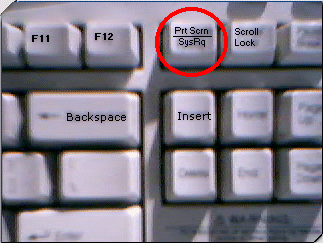
you can hit Print Screen. Then open up Microsoft Paint.
In paint, click on the File tab and click PASTE. The pic will pop up. Edit it to how you would like to look then save it. BAM, you now have your pic saved to your comp.
Reply

Trending Topics

Old Sep 9, 2004 | 11:51 AM
  #8  
eniety's Avatar
Registered User
 
Joined: Apr 2004
Posts: 332
Likes: 0
From: Dryden
Default

Print screen doesn't actually print. It takes a screenshot and copies it to the clipboard. From there you can paste it into an image editing software (photoshop), crop it, and save it. You can also just take a screenshot of just the active window by using alt + print screen.
Reply
Old Sep 9, 2004 | 12:05 PM
  #9  
Corleone's Avatar
Thread Starter
Registered User
 
Joined: Mar 2003
Posts: 182
Likes: 0
From: Istanbul, Turkey
Default

wow ! It actually worked, thanks evereyone... you've been a huge help !!!
Reply
Related Topics
Thread
Thread Starter
Forum
Replies
Last Post
Spoonie
Site Info
5
Sep 27, 2006 09:40 AM


All times are GMT -8. The time now is 10:55 AM.