


DL1 sensor connections?



Joined: Feb 2008
Posts: 4,580
Likes: 2
From: Fresno, CA

Hey guys,
I just picked up a DL1, Dash2 & the ECU interface cable to connect to my AEM EMS so I can easily read most of the stock sensors through the EMS (or at least I hope).
I'm looking for a little more information or suggestions for those of you who have daisy chained the this set up to an AEM EMS with a Dash2. I know there has to be a few of you guys running this same set up!
What data are you receiving flawlessly from the serial connection to the EMS?
Are there any sensors that are better tapped from the loom instead of directly from the EMS?
Is any scaling needed for the serial connections (fuel)?
What are the problems that you experienced?
Lastly I'm a little confused with what the connections are that are not specifically labeled (Analogue)? Any idea what sensors or connections these are?
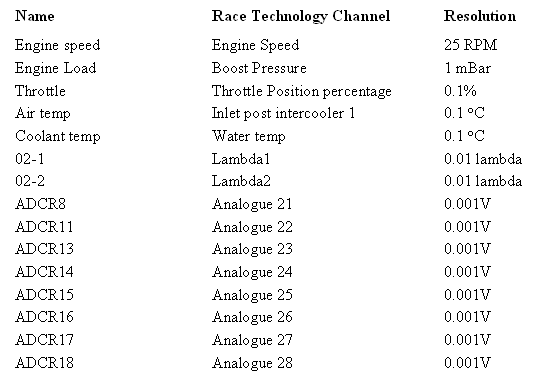
I haven't actually played around with it just yet but I'm more or less expecting it to not be a very smooth install...even with the serial connection to the EMS. Any help or suggestions that you can give me would definitely help cut down on the confusion.
-Rob
I just picked up a DL1, Dash2 & the ECU interface cable to connect to my AEM EMS so I can easily read most of the stock sensors through the EMS (or at least I hope).
I'm looking for a little more information or suggestions for those of you who have daisy chained the this set up to an AEM EMS with a Dash2. I know there has to be a few of you guys running this same set up!
What data are you receiving flawlessly from the serial connection to the EMS?
Are there any sensors that are better tapped from the loom instead of directly from the EMS?
Is any scaling needed for the serial connections (fuel)?
What are the problems that you experienced?
Lastly I'm a little confused with what the connections are that are not specifically labeled (Analogue)? Any idea what sensors or connections these are?
I haven't actually played around with it just yet but I'm more or less expecting it to not be a very smooth install...even with the serial connection to the EMS. Any help or suggestions that you can give me would definitely help cut down on the confusion.
-Rob


Joined: May 2001
Posts: 920
Likes: 0
From: Vallejo
Rob,
There is a direct serial connection you can use from the Dash 2 or DL1 to the AEM ECU. I assume this is what you are talking about. It works pretty well I've found. Any of the Serial Gauge parameters from the AEM are available and work well.
Bill
www.LPIRacing.com
There is a direct serial connection you can use from the Dash 2 or DL1 to the AEM ECU. I assume this is what you are talking about. It works pretty well I've found. Any of the Serial Gauge parameters from the AEM are available and work well.
Bill
www.LPIRacing.com
Joined: Feb 2008
Posts: 4,580
Likes: 2
From: Fresno, CA
Bill that's great news! That is exactly what I have. Just been reading all the information in the help section of the software and now its getting me confused. Looking at the wiring...it looks much simpler that it probably really is.
Do you know if the fuel level is also one of the sensors that works through the serial cable?
Do you know if the fuel level is also one of the sensors that works through the serial cable?
Joined: May 2001
Posts: 920
Likes: 0
From: Vallejo
Nope. Only the stuff available to the AEM.
Byte Name Units Scalar Offset Min Max Signed? Bitmask
1 Engine Speed rpm 100 0 0 25599.60938 n -
2 Engine Load PSIg 0.056671 -14.69500 -14.69500 -0.18742 n -
3 Throttle % 0.390625 0 0 99.99847 n -
4 Air Temp F 1.800000 32 -198.39999260.60001 y -
5 Coolant Temp F 1.800000 32 -198.39999260.60001 y -
6 ADCR11 Volts 0.019546 0 0 5.003597 n -
7 ADCR13 Volts 0.019546 0 0 5.003597 n -
8 ADCR14 Volts 0.019546 0 0 5.003597 n -
9 ADCR17 Volts 0.019546 0 0 5.003597 n -
10 ADCR18 Volts 0.019546 0 0 5.003597 n -
11 ADCR15 Volts 0.019546 0 0 5.003597 n -
12 ADCR16 Volts 0.019546 0 0 5.003597 n -
13 ADCR08 Volts 0.079360 0 0 20.31585 n -
14 O2 #1 AFR 0.057188 7.320000 7.320000 21.90281 n -
15 O2 #2 AFR 0.057188 7.320000 7.320000 21.90281 n -
16 Vehicle Speed MPH 1 0 0 255.99609 n -
17 Gear Calculated 1 0 0 255 n -
18 Error #1 1 0 0 255 n -
19 Error #2 1 0 0 255 n -
Byte Name Units Scalar Offset Min Max Signed? Bitmask
1 Engine Speed rpm 100 0 0 25599.60938 n -
2 Engine Load PSIg 0.056671 -14.69500 -14.69500 -0.18742 n -
3 Throttle % 0.390625 0 0 99.99847 n -
4 Air Temp F 1.800000 32 -198.39999260.60001 y -
5 Coolant Temp F 1.800000 32 -198.39999260.60001 y -
6 ADCR11 Volts 0.019546 0 0 5.003597 n -
7 ADCR13 Volts 0.019546 0 0 5.003597 n -
8 ADCR14 Volts 0.019546 0 0 5.003597 n -
9 ADCR17 Volts 0.019546 0 0 5.003597 n -
10 ADCR18 Volts 0.019546 0 0 5.003597 n -
11 ADCR15 Volts 0.019546 0 0 5.003597 n -
12 ADCR16 Volts 0.019546 0 0 5.003597 n -
13 ADCR08 Volts 0.079360 0 0 20.31585 n -
14 O2 #1 AFR 0.057188 7.320000 7.320000 21.90281 n -
15 O2 #2 AFR 0.057188 7.320000 7.320000 21.90281 n -
16 Vehicle Speed MPH 1 0 0 255.99609 n -
17 Gear Calculated 1 0 0 255 n -
18 Error #1 1 0 0 255 n -
19 Error #2 1 0 0 255 n -

Joined: Feb 2008
Posts: 4,580
Likes: 2
From: Fresno, CA
Yes. See the links.
I am still not sure about the fuel. I might just connect a warning light that runs off the stock dashes low fuel warning until I can fully figure it out. The purpose of the dash for me is primarily for its lap timing features and the ability to monitor the motor with out having a million gauges. Gas is the least of its features but I would like to get it up and running smoothly if I can.
http://www.race-technology.com/seria...ce_8_7551.html
http://www.race-technology.com/wiki/index....NDATAKSERIESECU
I am still not sure about the fuel. I might just connect a warning light that runs off the stock dashes low fuel warning until I can fully figure it out. The purpose of the dash for me is primarily for its lap timing features and the ability to monitor the motor with out having a million gauges. Gas is the least of its features but I would like to get it up and running smoothly if I can.
http://www.race-technology.com/seria...ce_8_7551.html
http://www.race-technology.com/wiki/index....NDATAKSERIESECU

Registered User
Joined: Jun 2002
Posts: 1,040
Likes: 2
From: Mathews, AL
My Saturday afternoon project today was to connect the ECT wire from the PCM to my DL1 + Dash3 in my AP1.
Of course, simply hooking it up is not enough - I had to figure out how to convert from voltage to temperature since I wanted a Fahrenheit coolant temp displayed on the Dash3. I thought this post might be of use to other DL1 and Dash3 owners who wish to do the same.
Thankfully, s2ki member modifry had already done the heavy lifting. Modifry makes and sells several extremely useful S2000 products, I own his shift beeper, aftermarket headunit adapter, and seat belt locker. I thought about buying his ECT module, but that would've been a waste, seeing as I already have a DL1 and Dash3.
In his ECT module install instructions, modifry is kind enough to include a table of voltage to temperature data, from 1.495 volts which is 130F to 0.286 volts which is 250F. He built the table using real data, and did so in 2 degree increments, which is good, since the voltage to temperature function is not linear. Without his data set, my little project would have ended before it began...
So I pasted modifry's data into Excel, charted the voltage-temp data, then used Excel to generate a "trendline" and tell me the function. According to modifry's data, and my Excel machinations, the PCM ECT wire voltage to temperature relationship can be represented with this function:
y = -71.9321ln(x) + 158.2882
Where 'y' is the temperature in Fahrenheit given voltage 'x'.
A copy of my spreadsheet and chart is available here: Google Docs AP1 S2000 ECT Plot. I couldn't figure out how to have Google's spreadsheet generate the function, so you can take my word for it, or export to Excel and generate it yourself. I've also never used Google docs before, so if you can't download it just let me know.
Once I knew the function I was able to use the Race Technology Dash 3 software (the screen builder) to assign the function given above to the input that I hooked the ECT voltage to. By the way, the Race Technology software will also generate a function given a data set, but it generated a polynomial function rather than using natural log. I'm going with the Excel function for now, unless the s2ki hivemind says otherwise.
I've not had a chance to test this yet; although my test will end up being rather rudimentary since I don't have any way to confirm that the numbers I'm seeing on the Dash3 are correct - all I really know is that the third bar on the dash lights up at 160F. Maybe there's a diagnostic tool that could be used to confirm the temps?
Of course, simply hooking it up is not enough - I had to figure out how to convert from voltage to temperature since I wanted a Fahrenheit coolant temp displayed on the Dash3. I thought this post might be of use to other DL1 and Dash3 owners who wish to do the same.
Thankfully, s2ki member modifry had already done the heavy lifting. Modifry makes and sells several extremely useful S2000 products, I own his shift beeper, aftermarket headunit adapter, and seat belt locker. I thought about buying his ECT module, but that would've been a waste, seeing as I already have a DL1 and Dash3.
In his ECT module install instructions, modifry is kind enough to include a table of voltage to temperature data, from 1.495 volts which is 130F to 0.286 volts which is 250F. He built the table using real data, and did so in 2 degree increments, which is good, since the voltage to temperature function is not linear. Without his data set, my little project would have ended before it began...
So I pasted modifry's data into Excel, charted the voltage-temp data, then used Excel to generate a "trendline" and tell me the function. According to modifry's data, and my Excel machinations, the PCM ECT wire voltage to temperature relationship can be represented with this function:
y = -71.9321ln(x) + 158.2882
Where 'y' is the temperature in Fahrenheit given voltage 'x'.
A copy of my spreadsheet and chart is available here: Google Docs AP1 S2000 ECT Plot. I couldn't figure out how to have Google's spreadsheet generate the function, so you can take my word for it, or export to Excel and generate it yourself. I've also never used Google docs before, so if you can't download it just let me know.
Once I knew the function I was able to use the Race Technology Dash 3 software (the screen builder) to assign the function given above to the input that I hooked the ECT voltage to. By the way, the Race Technology software will also generate a function given a data set, but it generated a polynomial function rather than using natural log. I'm going with the Excel function for now, unless the s2ki hivemind says otherwise.
I've not had a chance to test this yet; although my test will end up being rather rudimentary since I don't have any way to confirm that the numbers I'm seeing on the Dash3 are correct - all I really know is that the third bar on the dash lights up at 160F. Maybe there's a diagnostic tool that could be used to confirm the temps?

Registered User
Joined: Jun 2007
Posts: 626
Likes: 0
From: Winnipeg, MB, Canada
I found that same Modifry page earlier this year. Once again he did some very nice work! I manually entered Modifry's values into the software and got this:
(-22.11300325) * VAR_0201^3 + (97.286775) * VAR_0201^2 + (-166.01598544) * VAR_0201 + (160.01047978)
'VAR_0201' is the raw voltage of the temp gauge.
The values don't match exactly with what I get from OBDII readings on my Scangauge, but it's good enough to infer trends. It may not be perfect but I really don't care if my coolant is 102.1 or 102.6 degrees C.

(-22.11300325) * VAR_0201^3 + (97.286775) * VAR_0201^2 + (-166.01598544) * VAR_0201 + (160.01047978)
'VAR_0201' is the raw voltage of the temp gauge.
The values don't match exactly with what I get from OBDII readings on my Scangauge, but it's good enough to infer trends. It may not be perfect but I really don't care if my coolant is 102.1 or 102.6 degrees C.
