


Introducing Infinite Scroll - Please Share Your Feedback!


Thread Starter
IB Staff


Joined: Jun 2013
Posts: 675
Likes: 79
 Introducing Infinite Scroll - Please Share Your Feedback!
We are currently testing a new, simpler way to read S2KI: Infinite Scroll! Now, instead of needing to click "Next" in a thread to keep reading its posts, half of you will see a layout that automatically loads the next page of a thread as you scroll. We've also updated a few other parts of the layout so they remain easily accessible while you read, including access to thread search, a button to jump to the first unread post, and a Quick Reply box that lets you type a reply while scrolling through the thread. Here's a sample screenshot:
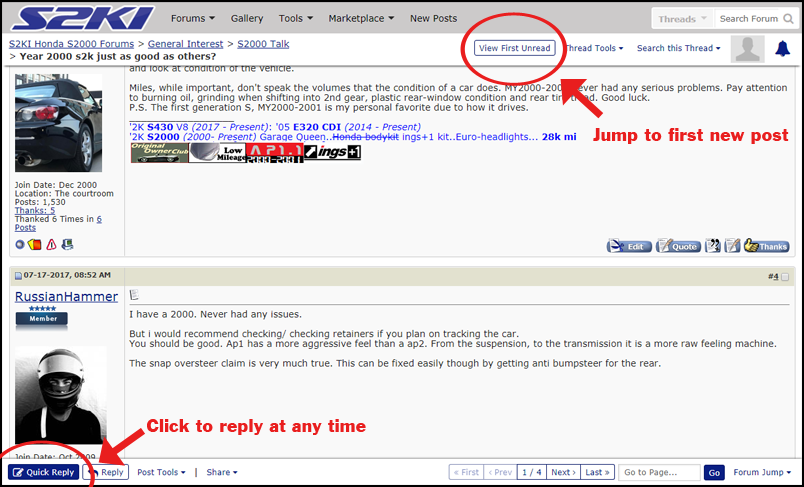
As mentioned above, Infinite Scroll is still in its testing phase. As such, you currently have 50/50 odds of seeing this design change. If you do, we'd love your feedback! Be it positive or negative, please don't hesitate to leave us your thoughts below. Likewise, we're happy to answer any questions you may have about the new functionality.
Thank you!
As mentioned above, Infinite Scroll is still in its testing phase. As such, you currently have 50/50 odds of seeing this design change. If you do, we'd love your feedback! Be it positive or negative, please don't hesitate to leave us your thoughts below. Likewise, we're happy to answer any questions you may have about the new functionality.
Thank you!


Member


Joined: Apr 2004
Posts: 82,468
Likes: 1,193
We are currently testing a new, simpler way to read S2KI: Infinite Scroll! Now, instead of needing to click "Next" in a thread to keep reading its posts, half of you will see a layout that automatically loads the next page of a thread as you scroll. We've also updated a few other parts of the layout so they remain easily accessible while you read, including access to thread search, a button to jump to the first unread post, and a Quick Reply box that lets you type a reply while scrolling through the thread. Here's a sample screenshot:
As mentioned above, Infinite Scroll is still in its testing phase. As such, you currently have 50/50 odds of seeing this design change. If you do, we'd love your feedback! Be it positive or negative, please don't hesitate to leave us your thoughts below. Likewise, we're happy to answer any questions you may have about the new functionality.
Thank you!
As mentioned above, Infinite Scroll is still in its testing phase. As such, you currently have 50/50 odds of seeing this design change. If you do, we'd love your feedback! Be it positive or negative, please don't hesitate to leave us your thoughts below. Likewise, we're happy to answer any questions you may have about the new functionality.
Thank you!
Member
Joined: Apr 2004
Posts: 82,468
Likes: 1,193

Thread Starter
IB Staff
Joined: Jun 2013
Posts: 675
Likes: 79
Quick Reply can be found in two spots. As was the case before Infinite Scroll, you can trigger Quick Reply by clicking the  button in the cluster of buttons along the bottom right of any individual post (where quote, thanks, etc. are listed). Alternatively, our new sticky bottom bar also includes a Quick Reply button to the far left side. In either case, when you click one of these Quick Reply buttons, it'll open the reply box that previously existed at the bottom of the thread. The box now overlays along the lower portion of the screen, allowing you to continue to scroll through the thread as you type your reply. This can be useful if you're looking to reference a specific comment as you type out your response. You can also hide the box by clicking "Quick Reply" a second time.
Hope that helps!
button in the cluster of buttons along the bottom right of any individual post (where quote, thanks, etc. are listed). Alternatively, our new sticky bottom bar also includes a Quick Reply button to the far left side. In either case, when you click one of these Quick Reply buttons, it'll open the reply box that previously existed at the bottom of the thread. The box now overlays along the lower portion of the screen, allowing you to continue to scroll through the thread as you type your reply. This can be useful if you're looking to reference a specific comment as you type out your response. You can also hide the box by clicking "Quick Reply" a second time.Hope that helps!





Trending Topics
Thread Starter
IB Staff
Joined: Jun 2013
Posts: 675
Likes: 79





 Noticeably slower.