


Adding Bluetooth to Stock Headunit


Thread Starter
Registered User

Joined: Feb 2014
Posts: 258
Likes: 2
 Adding Bluetooth to Stock Headunit
I wanted a way to get audio from a device to the stock stereo (in a 2006 S2000) and looked at a lot of different options. I finally decided on a bluetooth input since the headphone jack may or may not be going away and bluetooth/wireless seems to be the direction we are going in. So hopefully it's around for a while. Just wanted to share incase anyone was interested.
Pros:
Easy to install & and fits in the same space as the headunit
Good connectivity
Decent sound quality (uses the A2DP profile)
Retains stock controls/configuration & Seek/Skip button on headunit can control the tracks
Includes mic for calls over bluetooth
2 additional inputs are on the box (so I can include a headphone jack input later on)
Cons:
Could have probably just changed the headunit out for a similar cost
No title/track info (only reads BT STREAM)
Have to pair device within the first 3 minutes otherwise you are out of luck until the next time you remove power from the headunit.
Edit:
After some use added extra info now that I've had it for a couple months.
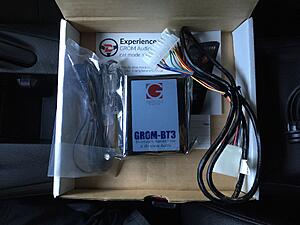
Package & contents.
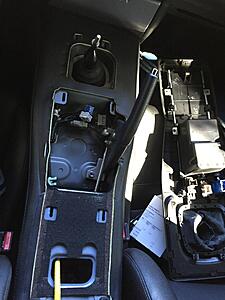
Center console removal (follow this)
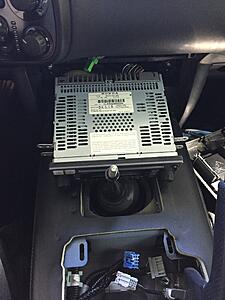
Remove headunit.
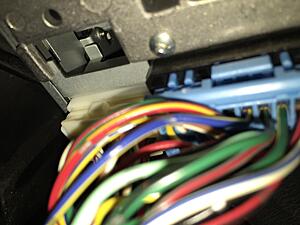
Disconnect white connector (XM satellite input) and plug the new harness inline and reconnect to headunit.
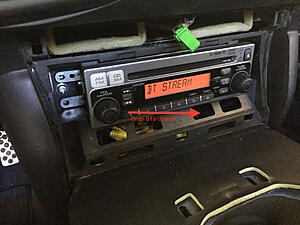
Grom BT3 location.
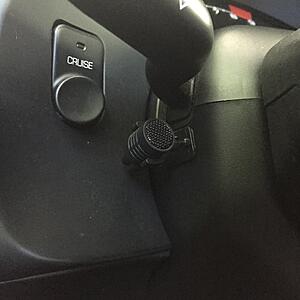
Mic location.
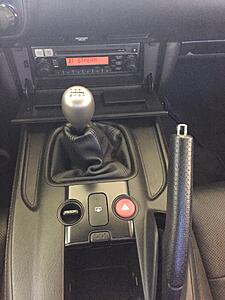
Everything back together.
Pros:
Easy to install & and fits in the same space as the headunit
Good connectivity
Decent sound quality (uses the A2DP profile)
Retains stock controls/configuration & Seek/Skip button on headunit can control the tracks
Includes mic for calls over bluetooth
2 additional inputs are on the box (so I can include a headphone jack input later on)
Cons:
Could have probably just changed the headunit out for a similar cost
No title/track info (only reads BT STREAM)
Have to pair device within the first 3 minutes otherwise you are out of luck until the next time you remove power from the headunit.
Edit:
After some use added extra info now that I've had it for a couple months.
Package & contents.

Center console removal (follow this)

Remove headunit.

Disconnect white connector (XM satellite input) and plug the new harness inline and reconnect to headunit.

Grom BT3 location.

Mic location.

Everything back together.

Last edited by electricmarauder; Oct 25, 2016 at 03:44 PM.


Joined: Nov 2002
Posts: 2,048
Likes: 8
From: Long Island, New York, US
I've been looking for a bluetooth solution for my 2003 stock head unit. Is this what you got?
https://gromaudio.com/store/usb_adap...interface.html
1) Will this work with a 2003 S2000 stock head unit? In the compatibility section, "Honda S2000 2004-2012" is listed. Not sure how accurate that is as there were no S2000s after 2009.
2) After this is installed, how would I listen to CDs (not that I would lol) or the traditional AM/FM radio? Am I stuck with having to use just whatever functionality this GROM unit offers (BT/aux/USB/etc), or can I switch back and forth between the functions of the GROM unit and the stock head unit (CD, AM/FM)?
3) When using a USB stick to play MP3s, will the song info show on the stock head unit? If not, how would you effectively navigate your library or know what song is playing? Not much of a problem with bluetooth, since you can just look at your phone's screen.
Thanks!
https://gromaudio.com/store/usb_adap...interface.html
1) Will this work with a 2003 S2000 stock head unit? In the compatibility section, "Honda S2000 2004-2012" is listed. Not sure how accurate that is as there were no S2000s after 2009.
2) After this is installed, how would I listen to CDs (not that I would lol) or the traditional AM/FM radio? Am I stuck with having to use just whatever functionality this GROM unit offers (BT/aux/USB/etc), or can I switch back and forth between the functions of the GROM unit and the stock head unit (CD, AM/FM)?
3) When using a USB stick to play MP3s, will the song info show on the stock head unit? If not, how would you effectively navigate your library or know what song is playing? Not much of a problem with bluetooth, since you can just look at your phone's screen.
Thanks!

Joined: Sep 2004
Posts: 1,574
Likes: 62
From: NJ USA
Honda sold an accessory trunk-mounted CD changer which connected to the stock headunit. These aftermarket Bluetooth adapters
usually plug into the CD changer port, so you'd still be able to use the headunit's CD player and radio - it's just taking the place of a
separate source that you presumably don't have. BTW, I think the XM radio receiver also uses this port.
Honda changed headunit suppliers, I believe with the introduction of the AP2, and the CD changer connector changed, so an adapter
made for a later headunit won't work in an earlier, and vice versa.
usually plug into the CD changer port, so you'd still be able to use the headunit's CD player and radio - it's just taking the place of a
separate source that you presumably don't have. BTW, I think the XM radio receiver also uses this port.
Honda changed headunit suppliers, I believe with the introduction of the AP2, and the CD changer connector changed, so an adapter
made for a later headunit won't work in an earlier, and vice versa.
Trending Topics
Joined: Nov 2002
Posts: 2,048
Likes: 8
From: Long Island, New York, US
Honda sold an accessory trunk-mounted CD changer which connected to the stock headunit. These aftermarket Bluetooth adapters
usually plug into the CD changer port, so you'd still be able to use the headunit's CD player and radio - it's just taking the place of a
separate source that you presumably don't have. BTW, I think the XM radio receiver also uses this port.
Honda changed headunit suppliers, I believe with the introduction of the AP2, and the CD changer connector changed, so an adapter
made for a later headunit won't work in an earlier, and vice versa.
usually plug into the CD changer port, so you'd still be able to use the headunit's CD player and radio - it's just taking the place of a
separate source that you presumably don't have. BTW, I think the XM radio receiver also uses this port.
Honda changed headunit suppliers, I believe with the introduction of the AP2, and the CD changer connector changed, so an adapter
made for a later headunit won't work in an earlier, and vice versa.
2 questions...
1. Can the AP2 head unit be used in my AP1? Will it connect to my existing OEM speakers and power supply easily? Are the the speaker and power supply ports different as well, or just the accessory CD changer port like you said?
2. Is the AP2 head unit an improvement over the AP1 in terms of sound quality and volume, or at least equal?
Thanks!
Joined: Sep 2004
Posts: 1,574
Likes: 62
From: NJ USA
All years' headunits are plug&play compatible with all years' cars, though as mentioned the accessory CD changer and XM radio receiver
are not compatible with all headunits.
I would imagine an AP2 headunit is at least as good as an AP1, which is not a very high bar, but I can't speak from experience as I have an
AP1 with an aftermarket headunit. Personally if I was trying to add Bluetooth functionality and would have to both swap the headunit and add
an adapter, I'd go with an aftermarket headunit.
are not compatible with all headunits.
I would imagine an AP2 headunit is at least as good as an AP1, which is not a very high bar, but I can't speak from experience as I have an
AP1 with an aftermarket headunit. Personally if I was trying to add Bluetooth functionality and would have to both swap the headunit and add
an adapter, I'd go with an aftermarket headunit.
Joined: Nov 2002
Posts: 2,048
Likes: 8
From: Long Island, New York, US
All years' headunits are plug&play compatible with all years' cars, though as mentioned the accessory CD changer and XM radio receiver
are not compatible with all headunits.
I would imagine an AP2 headunit is at least as good as an AP1, which is not a very high bar, but I can't speak from experience as I have an
AP1 with an aftermarket headunit. Personally if I was trying to add Bluetooth functionality and would have to both swap the headunit and add
an adapter, I'd go with an aftermarket headunit.
are not compatible with all headunits.
I would imagine an AP2 headunit is at least as good as an AP1, which is not a very high bar, but I can't speak from experience as I have an
AP1 with an aftermarket headunit. Personally if I was trying to add Bluetooth functionality and would have to both swap the headunit and add
an adapter, I'd go with an aftermarket headunit.

Thread
Thread Starter
Forum
Replies
Last Post