When you click on links to various merchants on this site and make a purchase, this can result in this site earning a commission. Affiliate programs and affiliations include, but are not limited to, the eBay Partner Network.
For those that want to connect to the backup light circuit without splicing into the factory wires, you can order 1 each of the 2 pin 090 series connectors at the top of this page to make your own patch harness.
You are my hero. I kept looking at all the Joying head units, but I didn't want to loose my radio cover door. That's part of the personality and "cleanness" of the vehicle.
Finally, there's a little single DIN Apple Car Play where I can get navigation, music, etc.
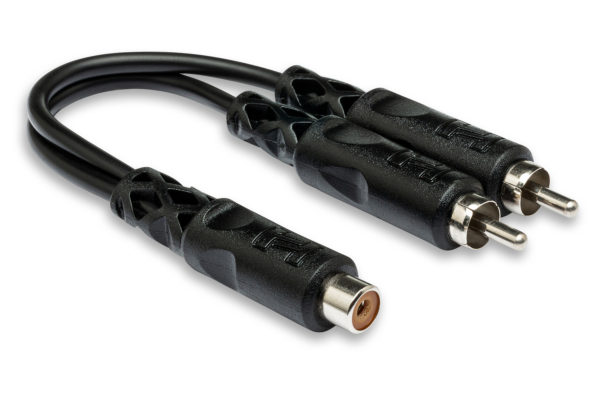
I wired the camera to always have power when car is on and wired reverse signal too. I used a RCA y-cable to connect rear camera to both rear and front camera input on the unit so I always have a backup camera in reverse and can optionally have one with the front camera input on the menu. https://hosatech.com/products/analog...ables/yra-105/
I wired the camera to always have power when car is on and wired reverse signal too. I used a RCA y-cable to connect rear camera to both rear and front camera input on the unit so I always have a backup camera in reverse and can optionally have one with the front camera input on the menu. https://hosatech.com/products/analog...ables/yra-105/
Awesome tips I will look into setting mine up similarly
What's up with the included GPS Antenna? The instructions don't really show what it's used for. Is it needed? Where would one mount it? Doesn't look to be waterproof, so not on the outside of the car. I've not seen any YouTube video even mention it.
Also, is the mounting sleeve actually needed or even used? Seems like the Honda brackets wouldn't fit very well with the sleeve installed.
Last edited by Bumlinger; Aug 11, 2024 at 01:51 PM.
I mounted the GPS antenna in the middle of the dashboard close to the windshield. I tucked the wire in crease the between the windshield and dashboard and ran it leftward until I could go behind and underneath the dash and back to the head unit. As far as the sleeve that came with the CP-71W, I didn't use it. I used the factory radio mounting brackets but only put one screw on each side of the CP-71W instead of two on each side like the factory radio.
Clean install for sure! But still, what is the GPS antenna actually used for? The HU doesn't have a stand alone navigation app, does it? From what I understand, the navigation apps are a reflection of the apps on your phone device. Does the GPS antenna somehow increase the location accuracy from CarPlay or Android Auto? I'm confused. Can't hardly wait to get it installed, I waiting on the Modifry harness and DCI to be delivered.
Speaking of DCI, the YouTube install videos with the Modifry harness and DCI keep the DCI out from behind the HU and tuck it in the passenger storage net. Once it is set up and working, is there any need to keep it out and handy? Couldn't you tidy things up a little and keep it out of the way behind the HU? Thanks!