


Smart Phone Data Acquisition



Joined: Oct 2007
Posts: 303
Likes: 0
From: Winnipeg

Thinking about picking this up and attaching it to the modifry/panavise quick-release base. It won't block the screen or the camera, and RAM cradles seem to get very good reviews. Anyone tried it?
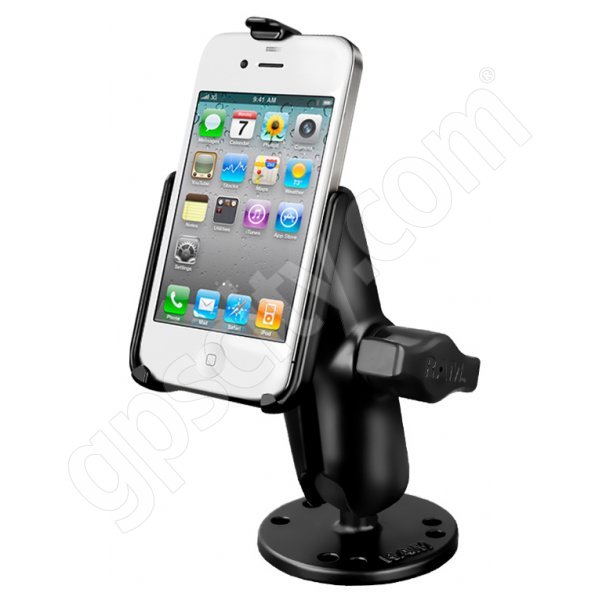
And another topic: Has anyone found a good muffler to block wind noise from your iPhone mic? (That's another thing I like about this mount -- if I find a muffler that works, I can stick it on the bottom of the mount and have a one-piece solution.)
And another topic: Has anyone found a good muffler to block wind noise from your iPhone mic? (That's another thing I like about this mount -- if I find a muffler that works, I can stick it on the bottom of the mount and have a one-piece solution.)

Joined: May 2008
Posts: 369
Likes: 3
From: Central Ar.
If you are using an iPhone to record video you can connect the ear buds and use the "+" button to start and stop recording (on the 4s). This will help a lot if your mount places the phone behind you and/or if you wish to cut down some wind noise. I have not tried it with HLT though.
Joined: Oct 2007
Posts: 303
Likes: 0
From: Winnipeg
If you are using an iPhone to record video you can connect the ear buds and use the "+" button to start and stop recording (on the 4s). This will help a lot if your mount places the phone behind you and/or if you wish to cut down some wind noise. I have not tried it with HLT though.
I haven't downloaded HLT yet but I'll confirm that it works as soon as I do.

Joined: Jul 2010
Posts: 750
Likes: 9
I ended up purchasing an Acer Iconia Tab to use for my car.
The things that I wanted which narrowed down my choices were:
GPS - for Trackmaster and daily navigation.
Android Market - required for Torque
3 axis accelerometer - for Trackmaster
Bluetooth - to connect Torque
I also purchase a Ram Mount, that I will use in conjunction with a Modifry Dash Mount.
The Iconia Tab comes in a 7 inch size (A100) which is about perfect for a car, and a 10 inch (A500) which is more functional if you want to use it for more than just the car.
My S2000 is parked for the winter, so as far as functionality of Torque, Trackmaster, and nav apps, I'll have to test them with my CR-V.
The things that I wanted which narrowed down my choices were:
GPS - for Trackmaster and daily navigation.
Android Market - required for Torque
3 axis accelerometer - for Trackmaster
Bluetooth - to connect Torque
I also purchase a Ram Mount, that I will use in conjunction with a Modifry Dash Mount.
The Iconia Tab comes in a 7 inch size (A100) which is about perfect for a car, and a 10 inch (A500) which is more functional if you want to use it for more than just the car.
My S2000 is parked for the winter, so as far as functionality of Torque, Trackmaster, and nav apps, I'll have to test them with my CR-V.
Joined: Oct 2007
Posts: 303
Likes: 0
From: Winnipeg
Originally Posted by ebdavis' timestamp='1325100488' post='21268921
If you are using an iPhone to record video you can connect the ear buds and use the "+" button to start and stop recording (on the 4s). This will help a lot if your mount places the phone behind you and/or if you wish to cut down some wind noise. I have not tried it with HLT though.
I haven't downloaded HLT yet but I'll confirm that it works as soon as I do.
In my very brief and unscientific test, the craptastic apple headphones' mic sounded about the same as the iPhone 4's built-in mic, whereas my $20 skullcandy headphones reduced ambient noise pick-up considerably.
Joined: Oct 2007
Posts: 303
Likes: 0
From: Winnipeg
FWIW, I'm using an iPhone 4. So I can't just tell Siri to start timing my laps either.


Registered User
Joined: Apr 2010
Posts: 162
Likes: 0
I have a PLX Kiwi Wifi for sale, if anybody is looking to use their Iphone to read codes, or datalog info.
PLX Kiwi Wifi
PLX Kiwi Wifi

Registered User
Joined: Jun 2009
Posts: 4,340
Likes: 0
From: Frankfort, KY
Dave's got me thinking and I'd like to be able to back up the camera to see more if I choose to. The question is where can I buy these post?


mounting it like this ^^ you get a bit of a wider view but I need post for the back to hold it down. As of right it viberates some because the back of the mount isn't bolted down.
I'm thinking the post I need are Mcmaster part number 93500A115
http://www.mcmaster.com/#standard-th...ndoffs/=fmutrl
mounting it like this ^^ you get a bit of a wider view but I need post for the back to hold it down. As of right it viberates some because the back of the mount isn't bolted down.
I'm thinking the post I need are Mcmaster part number 93500A115
http://www.mcmaster.com/#standard-th...ndoffs/=fmutrl