


Check Your Subframe Bolts



Joined: Dec 2001
Posts: 11,399
Likes: 19

Originally Posted by robinson' timestamp='1372065298' post='22626788
Alternatively, you could put the car on the alignment rack and move the subframe untill the alignment is even on both sides.
That's what I did.
That's what I did.
Now the front uppers are mounted tot he body and all lower are on the sub frame. Moving that may change your camber.

Thread Starter
Former Moderator


Joined: Jul 2005
Posts: 4,634
Likes: 28
From: West Virginia
Holy crap, I never noticed the rear upper arm, lower arm and toe arm are all mounted to the subframe.

Joined: Jan 2010
Posts: 2,925
Likes: 8
From: Largo, FL
I just want to say thanks to the OP for making this thread.
Ever since my first autox I've been in this section a lot more, and stumbled across this thread a few weeks ago. I finally got around to checking the bolts last night and a couple of mine we loose but not too loose. I still torqued everything to the specs listed on the previous page. Loving the peace of mind
Ever since my first autox I've been in this section a lot more, and stumbled across this thread a few weeks ago. I finally got around to checking the bolts last night and a couple of mine we loose but not too loose. I still torqued everything to the specs listed on the previous page. Loving the peace of mind


Registered User
Joined: Jun 2011
Posts: 65
Likes: 0
Thanks for the heads-up buddy. I checked mine and fortunately they are fine. Both front and rear subframes are aligned alright and only 2 of the 17mm bolts in the rear subframes were under-torqued tiny a little bit.
I live in Morgantown. Where in WV do you live?
I live in Morgantown. Where in WV do you live?
This is a repost from the alignment thread but I think it's important enough to warrant it's own thread. I checked my 12 subframe bolts and found 8 of them loose. My alignment settings were changing and I couldn't figure out why. Be sure and verify the subframe alignment using the reference holes shown in the shop manual diagram. A large punch will give you more accurate alignment than a screwdriver. If the alignment holes are off then loosen the subframe bolts enough to move the subframe into alignment then tighten and torque the bolts.
On the front subframe I checked the alignment holes and it appears the front subframe is pretty much centered but the two rearmost 17mm bolts were almost finger tight. I put a bunch of Locktite on them and torqued them to spec + 10%. All four of the big 19mm bolts were tight.
All six of my rear subframe bolts were loose. I verified the subframe alignment then removed the four 17mm bolts,one at a time, put a lot of Locktite on them then torqued them to spec + 10%. I made the mistake of removing one of the big 19mm bolts because it was a bitch to re-install. The shop manual says to replace the subframe bolts when you loosen them, I guess that's why. I simply torqued the other big 19mm bolt.
I'm embarrassed I went so long before checking the subframes. Checking these bolts will become a standard inspection for me.
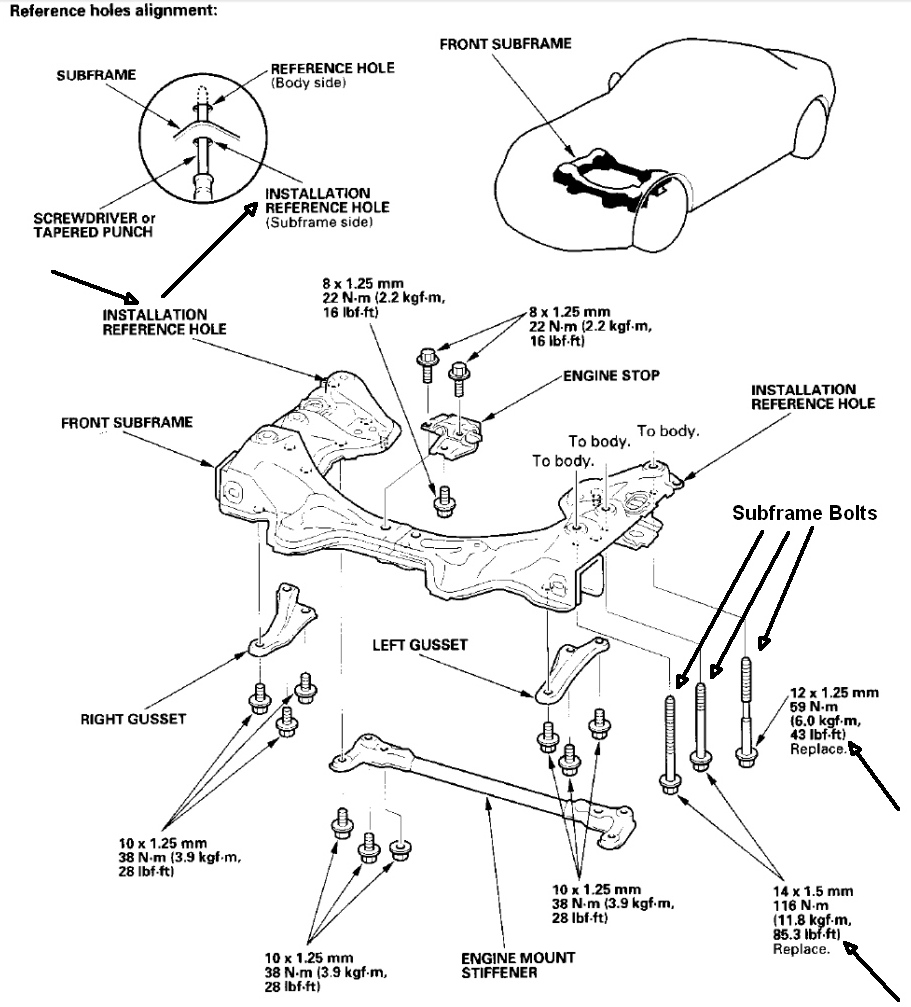
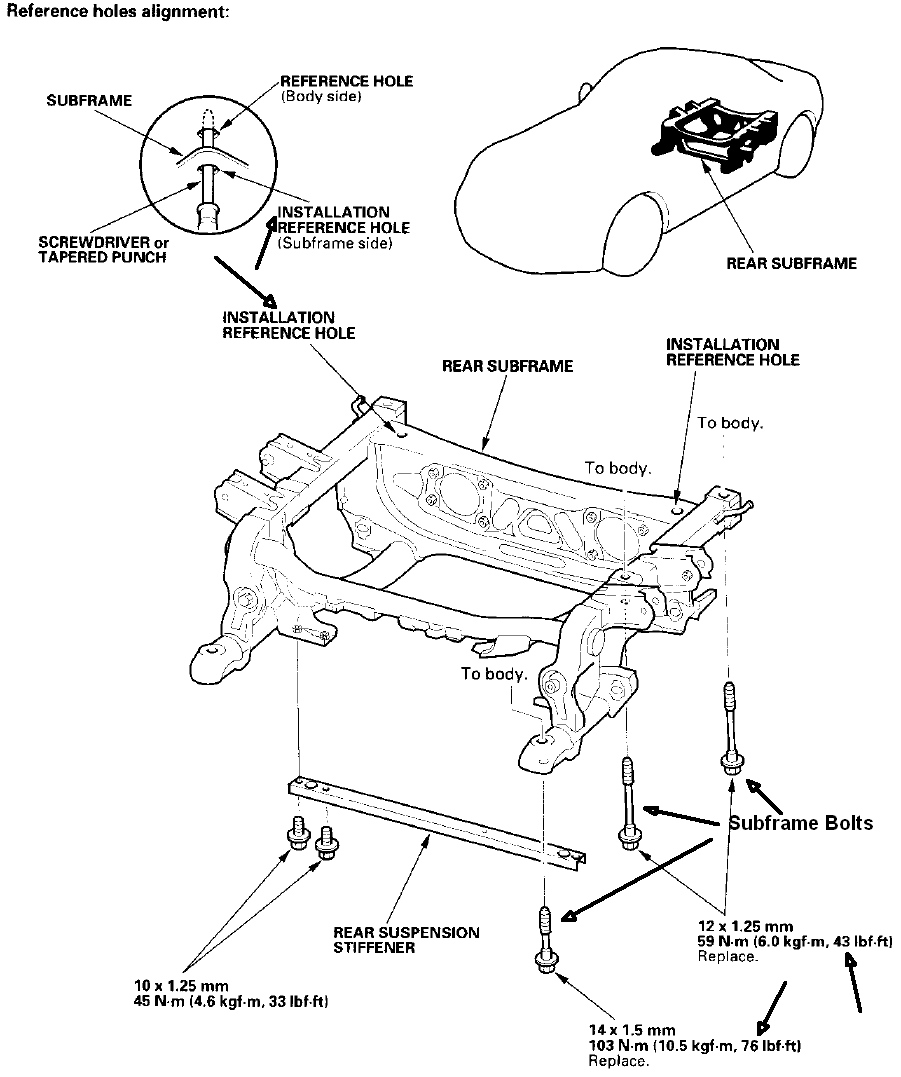
On the front subframe I checked the alignment holes and it appears the front subframe is pretty much centered but the two rearmost 17mm bolts were almost finger tight. I put a bunch of Locktite on them and torqued them to spec + 10%. All four of the big 19mm bolts were tight.
All six of my rear subframe bolts were loose. I verified the subframe alignment then removed the four 17mm bolts,one at a time, put a lot of Locktite on them then torqued them to spec + 10%. I made the mistake of removing one of the big 19mm bolts because it was a bitch to re-install. The shop manual says to replace the subframe bolts when you loosen them, I guess that's why. I simply torqued the other big 19mm bolt.
I'm embarrassed I went so long before checking the subframes. Checking these bolts will become a standard inspection for me.


Joined: Aug 2012
Posts: 8,759
Likes: 1,862
Basically, if they were loose, you should get a new alignment after you torque them down. Not because you just changed the alignment by torquing them, but because the alignment could have moved from when they were loose.
I would think a good rule of thumb would be to check the torque regularly, and especially before any alignment work.
What I'm unclear on is when you should replace the bolts. Is it if they are loose, I should really replace them, instead of just torquing them down? Or is it I should replace them if I have more than XX,xxx miles? Or you only need to replace them if you are doing some service that calls for removing these bolts?


Joined: Jan 2008
Posts: 1,279
Likes: 9
Originally Posted by tsuyoshi' timestamp='1377892579' post='22754203
Will torqueing the bolts mess up alignment of the car?
When I went for an alignment 1 month ago, everything was way off. May be it's this issue?
Does this need to be done on Ap2?
When I went for an alignment 1 month ago, everything was way off. May be it's this issue?
Does this need to be done on Ap2?
Basically, if they were loose, you should get a new alignment after you torque them down. Not because you just changed the alignment by torquing them, but because the alignment could have moved from when they were loose.
I would think a good rule of thumb would be to check the torque regularly, and especially before any alignment work.
What I'm unclear on is when you should replace the bolts. Is it if they are loose, I should really replace them, instead of just torquing them down? Or is it I should replace them if I have more than XX,xxx miles? Or you only need to replace them if you are doing some service that calls for removing these bolts?